Shard alert source rate limits
September 1, 2026
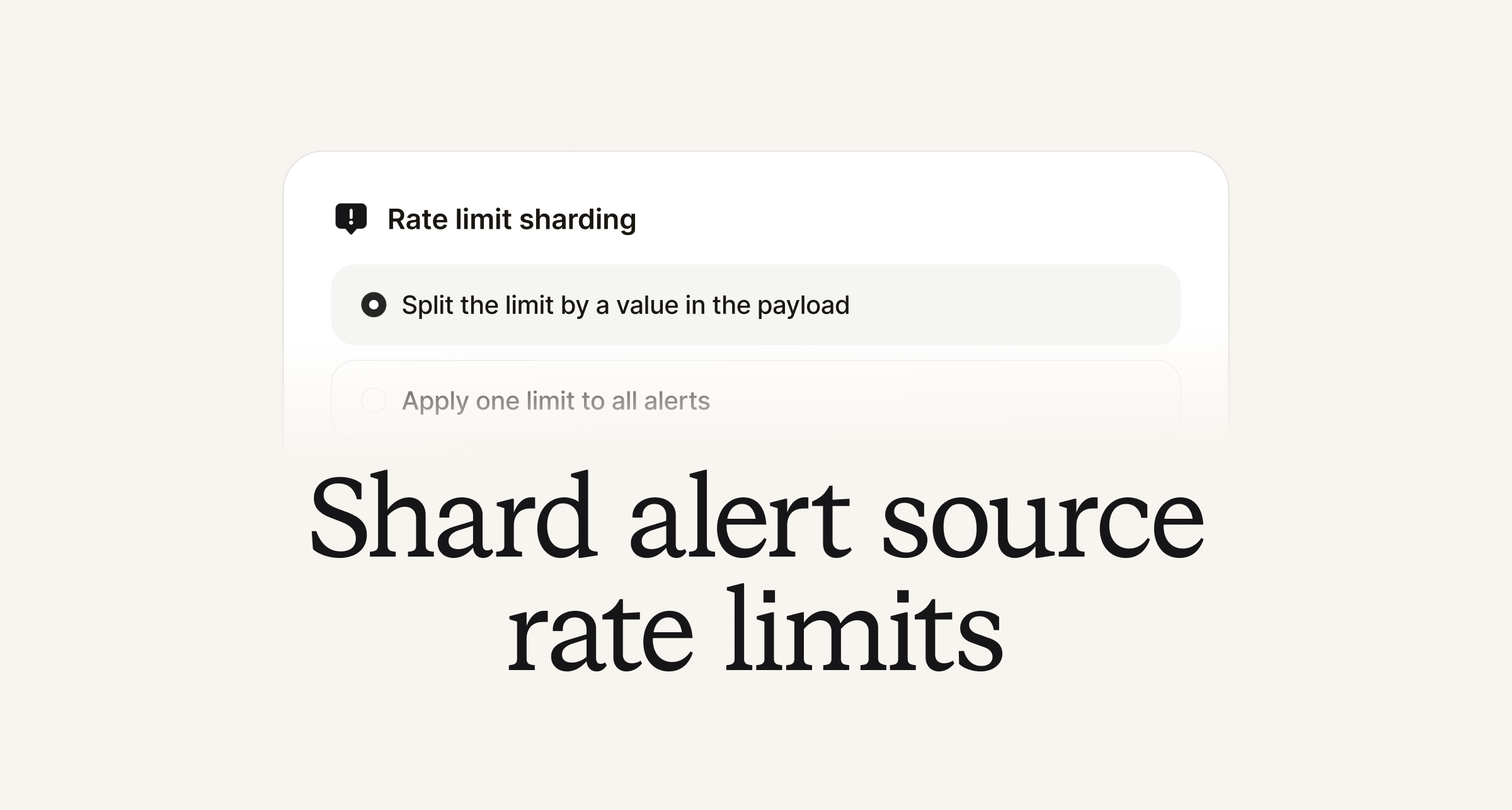
Alert sources have been updated to enable you to specify a query expression to extract a value from incoming alert payloads to shard rate limits on. This is useful when you want to separate rate limits for incoming alerts on a source so that one type of alert does not consume the source's rate limit for all other alerts coming from it.
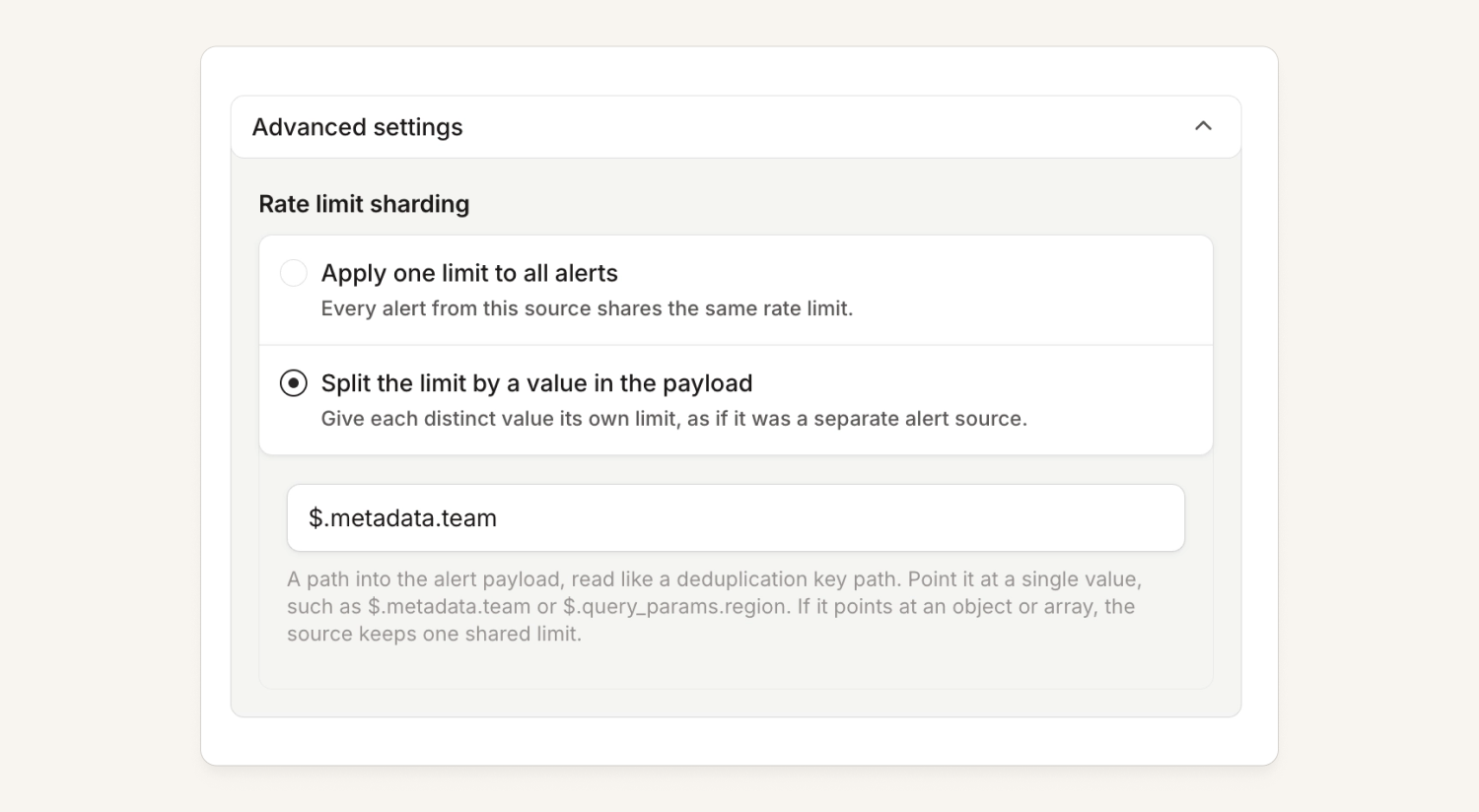
One example of when you might want to do this is when you have lots of low priority alerts that you are happy to be rate limited, but significantly fewer high priority alerts which you need to not hit the limit.
Each individual shard will have a separate 120/min rate limit.
On-call
You can now filter alerts at the alert source
Now, we let you filter out alerts within the source (as well as the route). This is the earliest opportunity for us to filter out alerts and means unwanted alerts don't clog up your Alerts list.
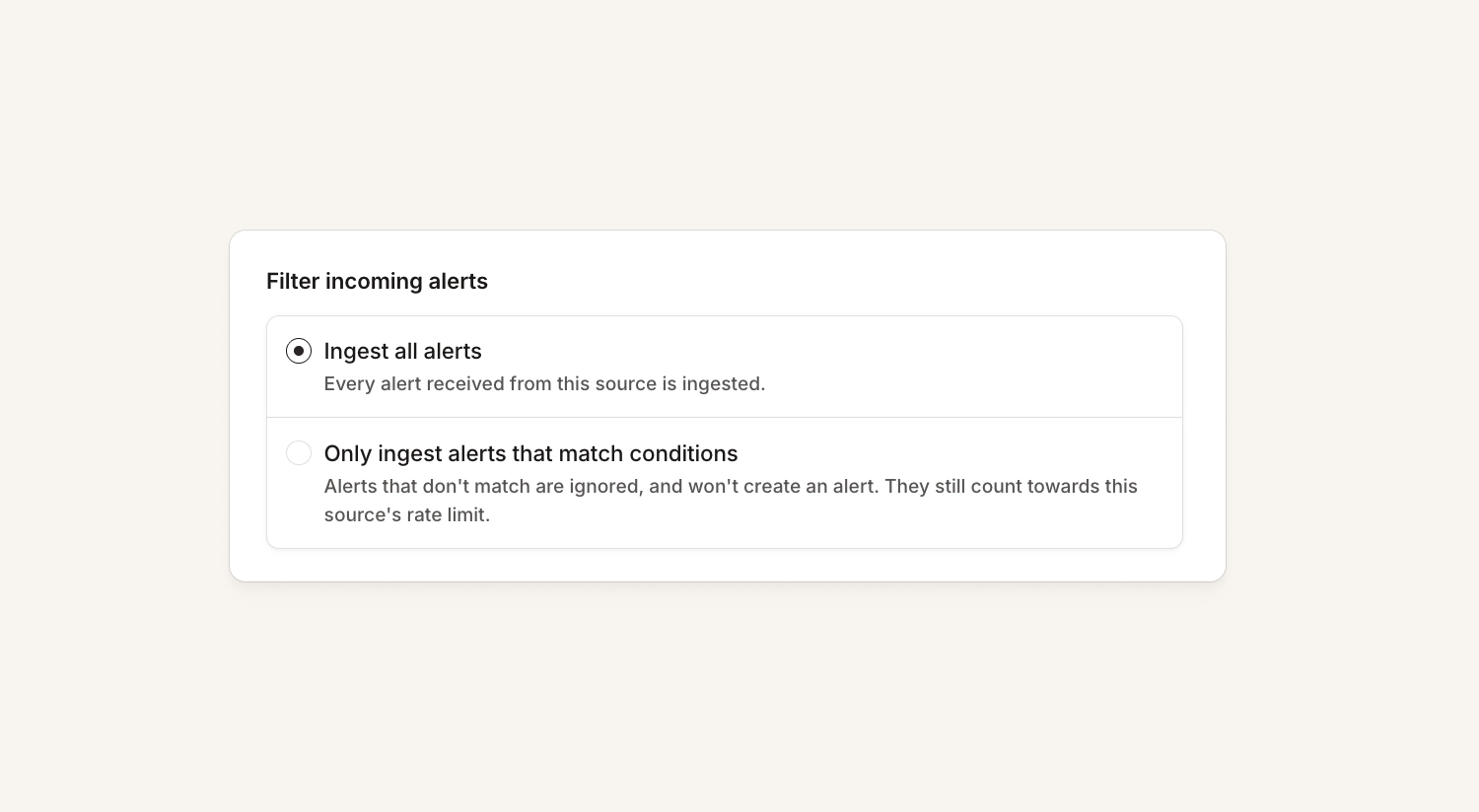
See full documentation for support here.
Improved Terraform for escalation paths
We've released a new beta resource for escalation paths: incident_escalation_path_beta!
The main changes are:
- Plan time validation of an escalation path.
- Added dedicated priority_one_of and working_hours_active conditions you can use instead of a full conditions block.
- Changed the schema from nested nodes to a flat map of node sequences, so there's no longer a maximum branch depth cap!
As ever, we may change this beta resource in backwards-incompatible ways, and the old incident_escalation_path resource is still available.
Escalation paths can now hand over to other escalation paths
You can now end an escalation path with a reassign step, which hands an unacknowledged escalation to another path. The original escalation expires and a new one starts on the target path.
Define one "fallback" path and point several team paths at it. Reassign steps can follow a retry node, so a path can try its own on-call a few times before handing over.
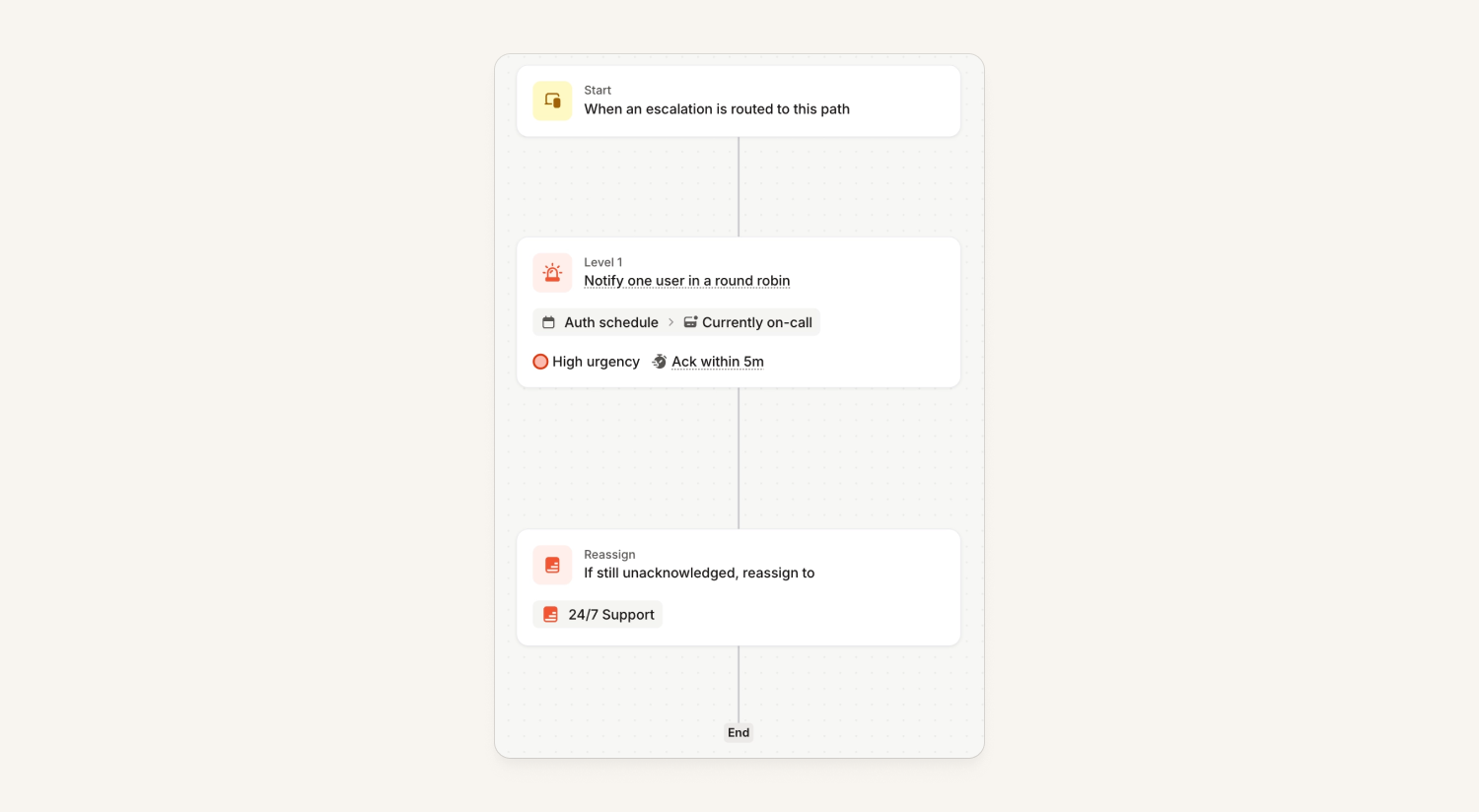
A reassignment timeline item is shown on the original escalation and the reassigned escalation (so you can navigate between them).
A few things worth knowing:
- The original escalation is expired rather than resolved (because nobody acknowledged it)
- You can configure escalation paths that reassign in a loop
- Escalations that reassign to more than 10 escalation paths will auto-expire instead of reassigning - this is to prevent infinitely looping escalations
Investigations
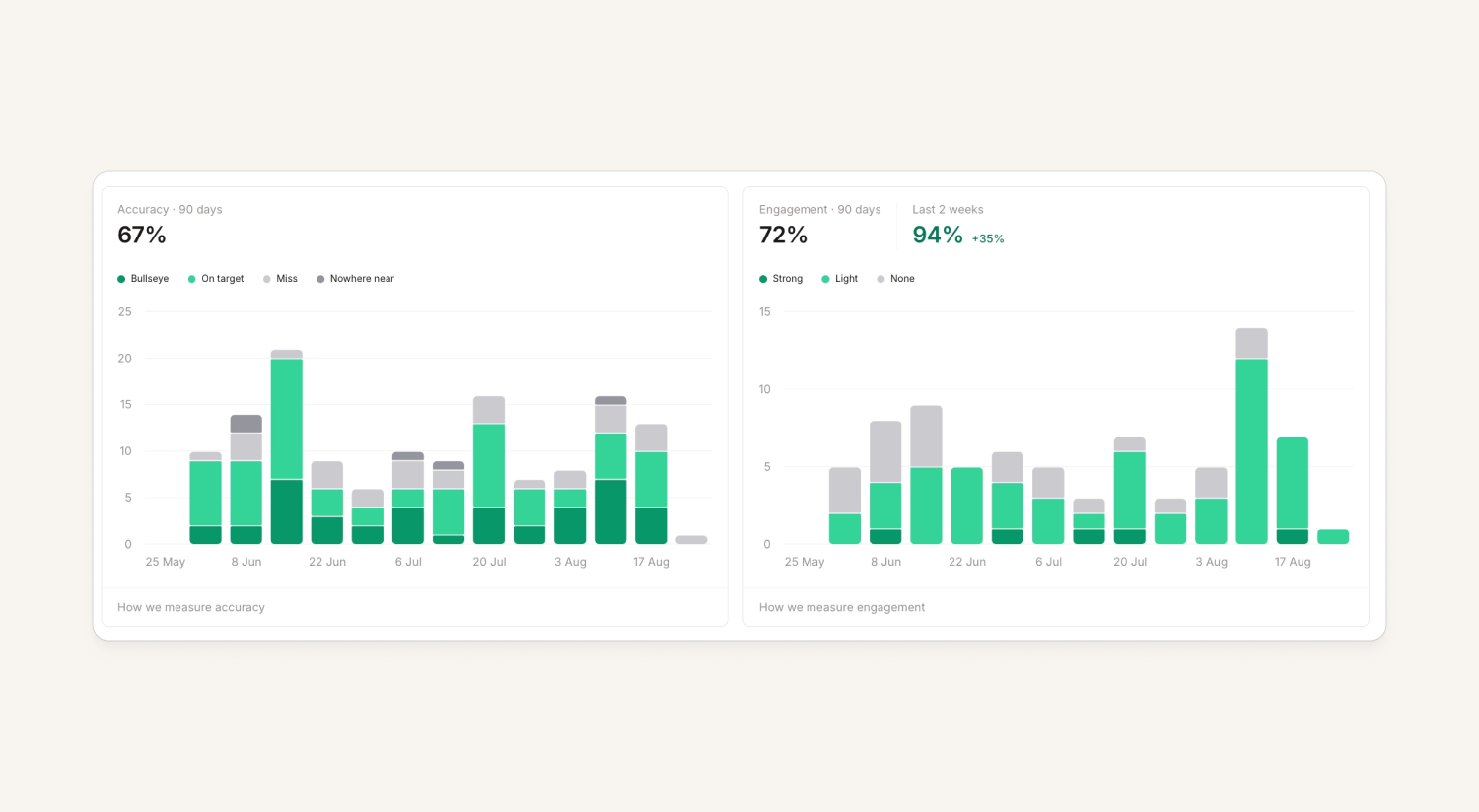
Investigations homepage shows trends
Our investigations homepage shows a 90 day performance window which means accuracy and engagement figures are averaged over this period. We’ve added trends for accuracy and engagement, so it’s more clear when things are trending upwards.
Telemetry RBAC
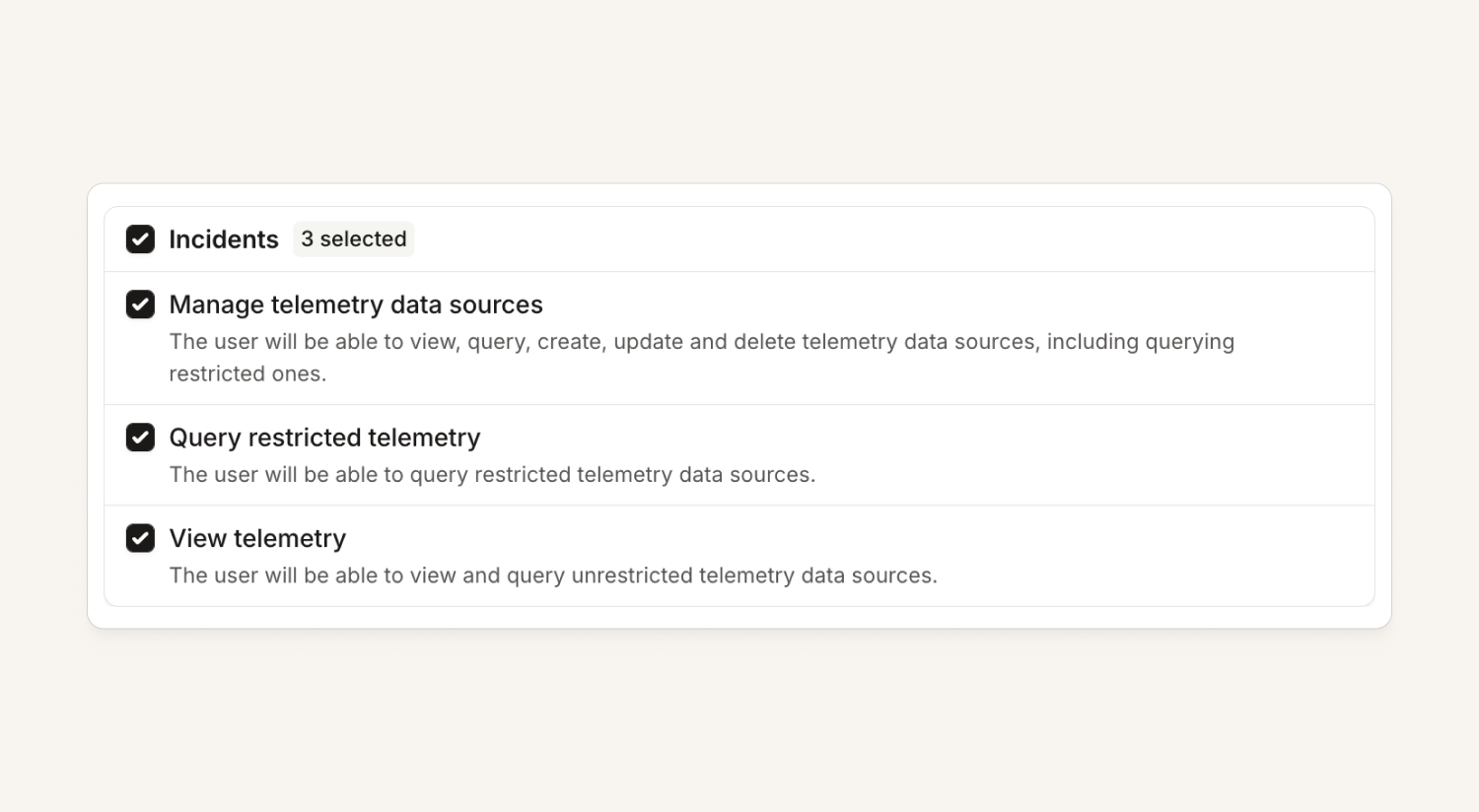
We've split out permission to manage telemetry into granular RBAC scopes, as well as introducing team-based permissions per telemetry data source.
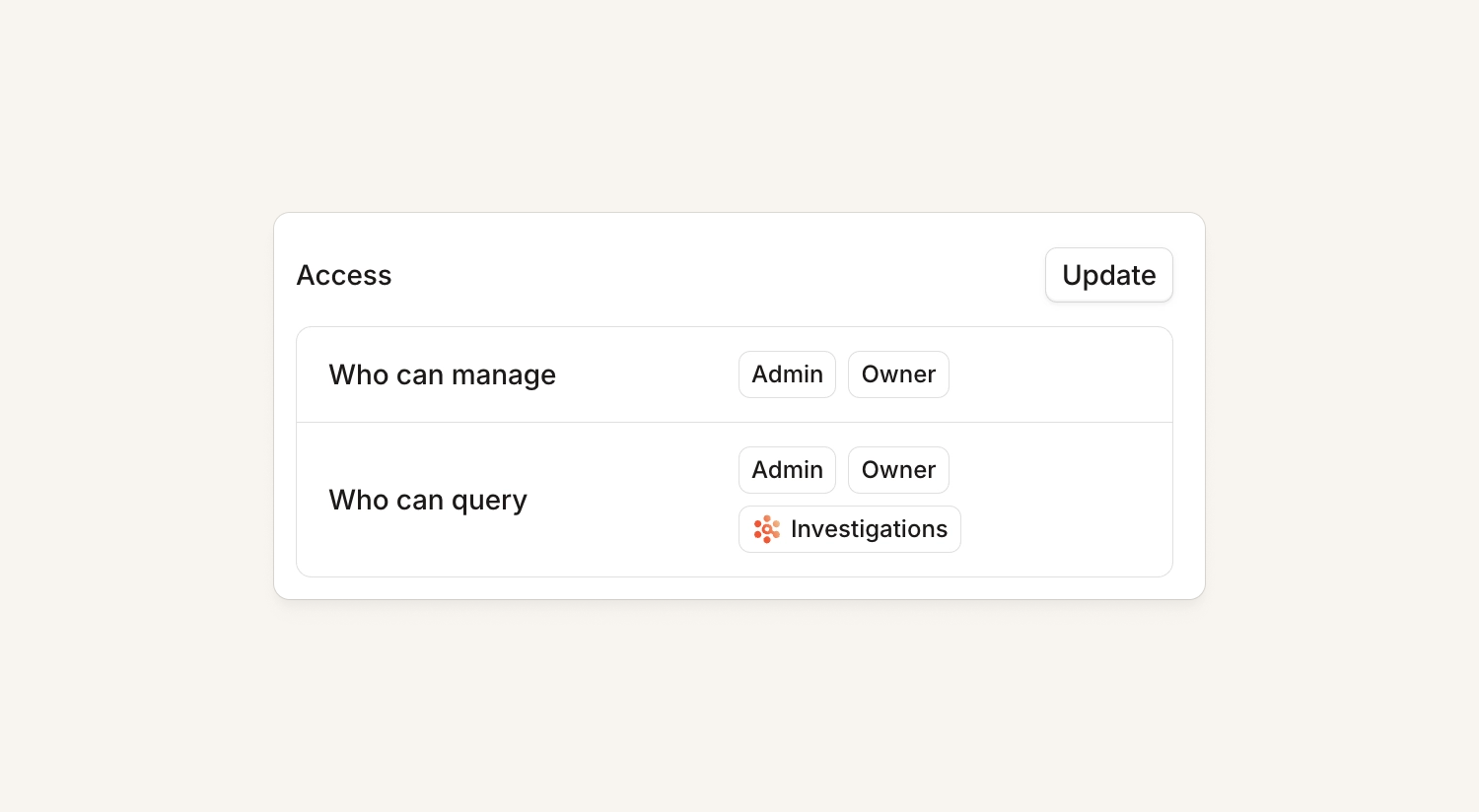
Customers can mark specific sensitive data sources as 'restricted' to limit which users and API keys have access to query them.
View our external loom as well as documentation in the help centre.
Nexus
Nexus now tells you when something's broken
Issues with your Nexus setup will now be clearly surfaced on the Nexus homepage, and our health score more accurately reflects any problems. So far, we will inform people of:
- Broken connections to Code and Documentation providers (e.g. Github, Gitlab, Notion)
- Broken connections to Telemetry sources (e.g. Grafana, GCP, Datadog)
- Specific Telemetry health issues (e.g. low query success rates)
Response
Private incidents in Insights
Every Response Insights dashboard now has a toggle for any organization with at least one private incident. Turn it on and the graphs include the private incidents that you have access to. To be explicit: no new permissions, no new access. You can only see what you could always see but now on graphs.
This is great if you:
- Need trends across all your organization’s incidents for regulatory or board reporting
- Are a team like Security where every incident is private, and Insights was therefore an empty experience
- Want to see time spent on incidents including private ones, so you can check on workload
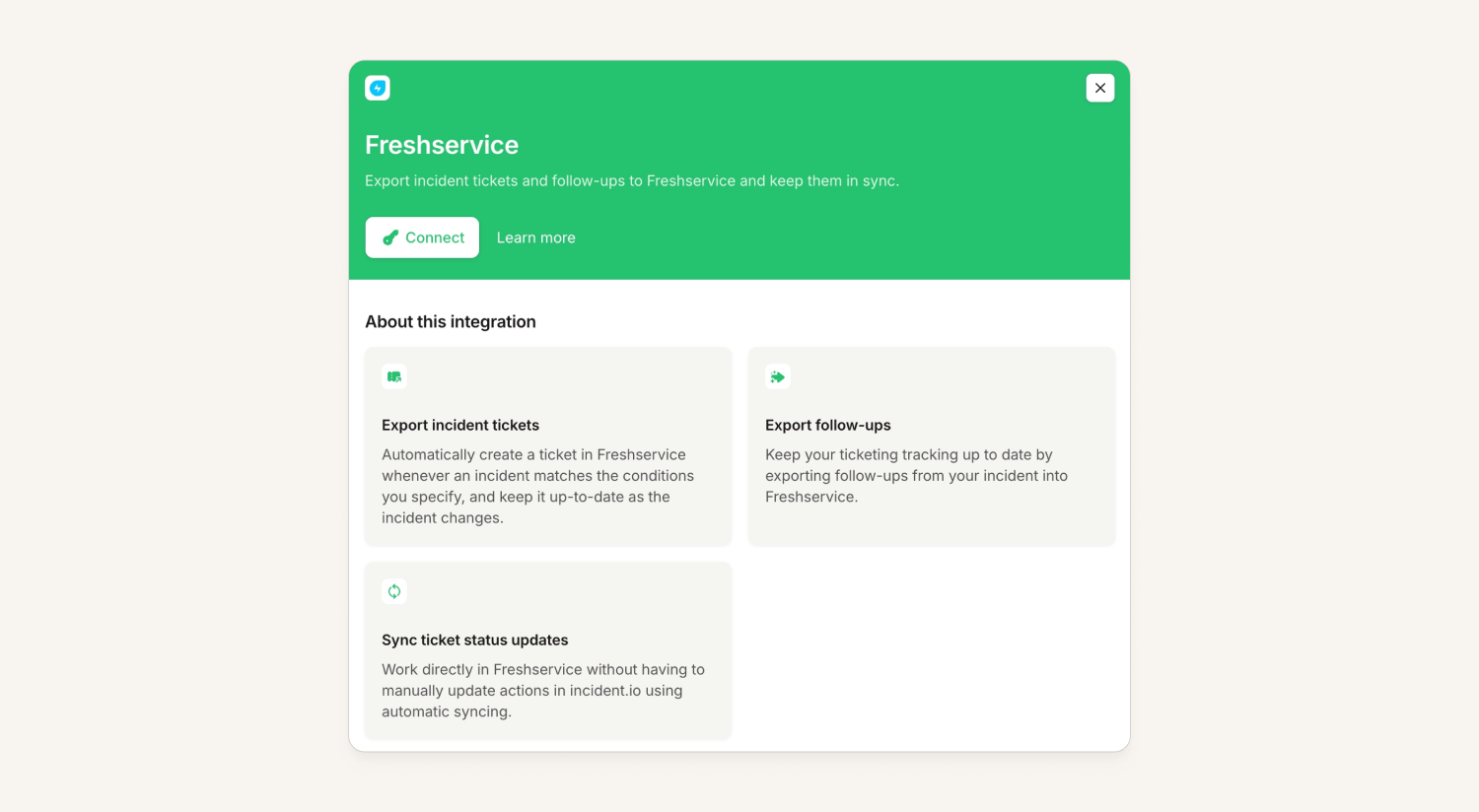
Freshservice ITSM Integration
We now support Freshservice as an issue tracker, meaning you can:
- Create incident tickets in Freshservice which update as your incident progresses
- 2-way sync so comments on the ticket come into the incident channel, and we post updates back to the ticket
- Create follow-ups in Freshservice (which will be children of the incident ticket, if there is one)
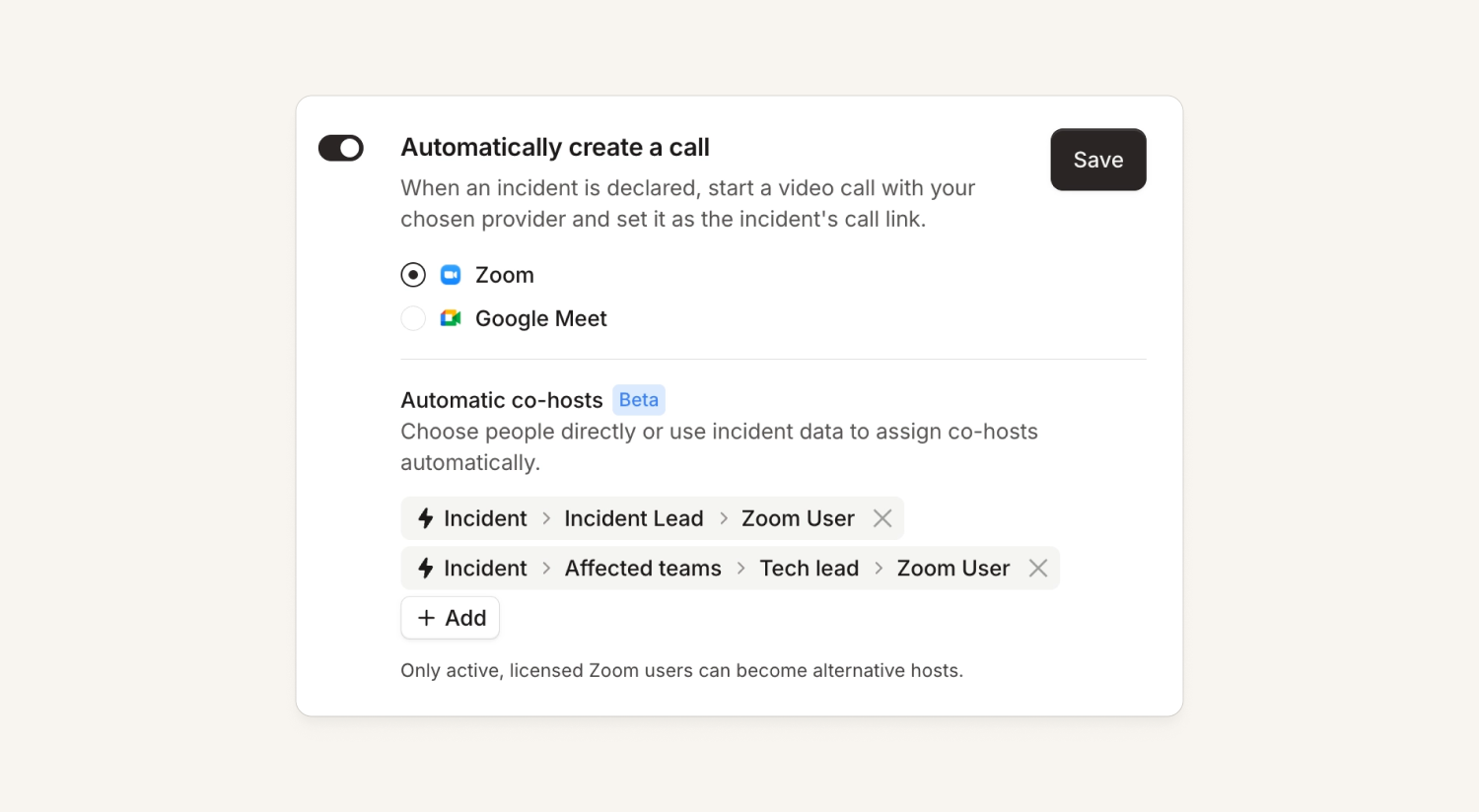
Co-hosts for Zoom incident calls (Beta)
You can now add co-hosts to Zoom calls we create. This lets you do things like "the incident commander and comms lead are co-hosts and can manage the bridge call" or "everyone in the IRM team are automatically added as co-hosts of the incident call.”
Platform
Edit your catalog from inside Settings → Teams
We've had feedback in the past that setting up teams isn’t the most intuitive. So, we've done some work here to hopefully make it simpler:
- You can now edit your Team catalog type without leaving Settings → Teams - it's all there for you. You can also create new teams (assuming they're managed in the dashboard)
- You can still edit everything in catalog, if you're someone that prefers that model
- We've fixed a ton of tiny bugs that we found along the way
Policies now have a page for viewing and dismissing violations
Until now, clicking on a policy anywhere in the product (the policies list, a Slack/email policy report, the needs-attention tiles) dumped you straight into the edit form. This was a bit much if you just wanted to see what the policy is triggering and dismiss some violations. Now every policy has a read-only view page showing its violations:
- Summary cards up top: current, overdue, due soon and unassigned counts, click one to filter the table
- A searchable table of every violation, with the incident or schedule, the assignee and when it's due
- Bulk dismiss and restore violations right from the page (permission-gated, obviously)
- It only needs the view permission to access, so anyone in the organization can see the list, but only those with the correct permissions can dismiss.
Terraform workflows polish
We've made some big improvements to the incident_workflow Terraform resource (documentation and examples), and some small improvements to the resource itself!
There's now:
- More examples, and all the examples showcase proper use of the provider.
- We've also copied over the nicer parameter binding syntax we introduced for alert sources,
- There's now exhaustive lists of what values each attribute can contain where possible.
This all should make Terraform workflows much easier to generate using code agents.
API
We’ve been adding new items to our public API to allow you to do even more than before. This includes:
- Updating and deleting schedule overrides
- Acknowledging and snoozing escalations
- Attaching alerts to incidents, and detaching them
- Creating incident updates
In addition, we now have an automatically generated and maintained API changelog in our docs. It's also been backfilled back to January, so there's a lot in there.
Status Pages
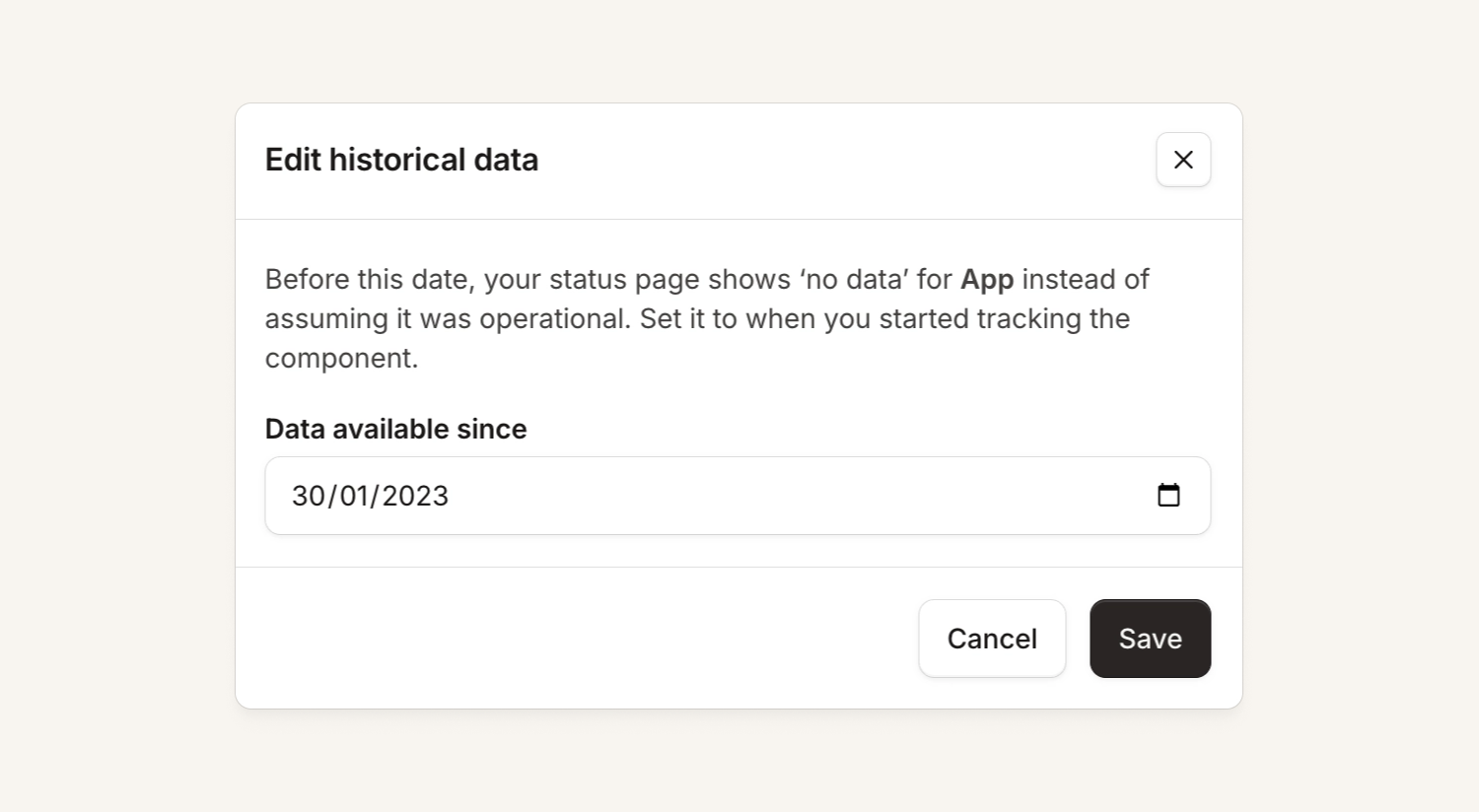
Control your status page component history
After you've added a new component, you can now choose where your history 'starts' so instead of having grey bars, you can decide to show it as green from a chosen point in time.
What else we've shipped
New
- On-callYou can now choose which columns you want to see when you're listing escalations, so you can hide columns you don't care about.
- On-callWe now have an Icinga plugin (on Github), which makes it easy to send alerts from Icinga into incident.io.
- On-callYou can now see ack-back events in the escalation timeline, making it clear when an alert was acknowledged in incident.io in response to an acknowledgment made in an external system like PagerDuty.
- ResponseWorkflows can now create private streams.
- ResponseYou can now export follow-ups as 'problem tickets' in ServiceNow (as well as Tasks).
- ResponseYou can now add a workflow step that creates a Linear issue directly, without first requiring a follow-up. When setting it up, you can choose a name and URL for a linked resource attachment.
- ResponseYou can now configure incident.io to automatically add co-hosts to Zoom incident calls, using a fixed list of people, incident roles (like lead or comms lead), or custom expressions. Co-hosts are kept up to date automatically as roles change, giving them host-only Zoom controls like recording and muting participants.
- ResponseAdded an epoch milliseconds time format for timestamp variables in the "Send a webhook" workflow step, making it easier to send incident timestamps to tools like Grafana's annotations API.
- ResponseYou can now sync a Notion database directly into your incident catalog. Create a Notion Database catalog type, choose the columns to import as attributes, and pages sync automatically on an hourly basis.
- ResponseYou can now turn off "catch me up" summaries while keeping other AI features enabled. The new toggle lives in Settings → Suggestions, and defaults to on.
- Status PagesYou can now edit the "data available since" date for standalone status page components under Status pages → Settings → Components, so historical uptime displays correctly without needing to contact us to fix it.
- Status PagesAtlassian Statuspage components are now synced into Catalog automatically, so you can cross-reference your incident.io services against Statuspage components in catalog queries and workflows without manually maintaining the mapping.
- PlatformYou can now sync a Notion database to Catalog.
- PlatformOwners can rename their organization from Settings → Organization, right next to the timezone setting.
- PlatformYou can now turn off catch me up summaries.
- PlatformYou can now rename your organization from Settings → Organization, so admins no longer need to contact support to fix an incorrect name. This is especially useful for Microsoft Teams installs, where the name is often set to a poor default at signup.
Improvements
- ResponseWe've improved the formatting of Microsoft Teams messages for stream creation and updates, making them more polished and consistent.
- ResponseTeams update-request notifications now include a Share Update button that opens the update form directly, so you no longer need to switch back to the dashboard to respond.
- ResponseThe Team filter on Response Insights dashboards (e.g. At a Glance) now defaults to "is part of" instead of "is". This means incidents from sub-teams are included by default, and the filter more clearly hints that other matching options are available.
- ResponseWe've added a new announcement retention mode that keeps posts for merged incidents while still removing posts for declined or canceled ones, so your channel reflects real incident impact without the noise.
- ResponseWe've added enforcement for mandatory and conditionally required fields when completing incident lifecycle actions, such as accepting an AI-drafted update or updating an incident. These actions are now blocked until all required fields configured for that stage have been filled in.
- ResponseWe've added a Reconnect option for Zoom, so you can refresh a broken connection directly without disconnecting and reinstalling the integration. This also fixes an issue where reconnecting Zoom by disconnecting and reinstalling could silently turn off the "automatically create a call" setting.
- ResponseThe "Create a stream" workflow step can now create private streams, matching the visibility options already available when creating a stream manually.
- InvestigationsMobile chat within an incident now shows a live investigation progress bar, so you can keep track of what the investigation is checking while you chat with the agent
- InvestigationsWe've moved "Context added" messages from the Investigations thread into the main incident channel, posted with the contributor's Slack name and avatar so context added to an investigation is more visible to the whole team.
- NexusYou can now ask the agent to make changes to a pull request on the PR announcement thread, not just the original thread where the PR was created
- NexusAWS data sources can now have their monitored regions and services reconfigured after install, directly from the dashboard — no need to uninstall and reinstall, which previously meant losing children, guidance, and memories.
- Status PagesWe've updated the updates timeline on status page incident details to use our shared response timeline UI, making it more consistent with the rest of incident.io.
- Status PagesWe've redesigned the component impact window editor on status pages with a full-width drawer, a live preview, and clearer, evenly sized controls for setting impact and time windows.
- PlatformThe Cortex integration now syncs multi-value (list) attributes defined via x-cortex-definition into Catalog, in addition to single-value attributes.
Bug fixes
- On-callFixed an issue where deleting a branch other than the last one in the if/else expression editor could incorrectly block save with a "Each rule must have at least one condition" error, even though the branch still had a valid condition.
- On-callFixed an issue where importing PagerDuty escalation policies collapsed round-robin steps into "notify everyone" at that level. Round-robin behavior is now preserved when you import from PagerDuty.
- On-callFixed an issue where an escalation delay caused by an escalation path was misattributed to the workflow that triggered the escalation. Escalation messages in Slack and Microsoft Teams now name the escalation path as the source of the delay.
- On-callWidening a column in the Alerts list now lets truncated attribute values expand to fill the available space, instead of staying clipped at a fixed width.
- On-callSchedule names on the Schedules page no longer get cut off, so long, team-prefixed names are fully visible and easier to tell apart in search results.
- On-callFixed an issue where alert groups from Grafana (using "one alert per group") could appear to flap — closing and reopening as a new alert — when one instance in the group resolved while others were still firing. Grouped alerts now stay open until every instance in the group has resolved.
- On-callFixed an issue where cover request DMs on Slack and Teams no longer named the schedule, making it hard to tell which rotation a request was for if you're on more than one.
- On-callFixed an issue where acknowledging an escalation's Slack channel notification during a delay step showed as acknowledged but didn't actually stop the escalation, so it paged again once the delay ended.
- On-callFixed an issue where typing in the Teams settings search box caused the page to flicker on every keystroke and added a browser history entry per character, making the Back button step through each letter instead of leaving the page.
- On-callFixed an issue where Android users could end up with several incident.io contact cards after an app update or reinstall.
- On-callFixed an issue where selecting two on-call schedules that shared an underlying layer would cause only one of them to render in the iOS app calendar, both in the day view and the month view dots.
- On-callFixed an issue where a responder who was paged for an incident wasn't automatically added to the incident's Slack channel if the underlying alert was grouped into the incident just after the page was sent. Paged responders are now reliably invited to the channel regardless of this timing.
- On-callFixed an issue where the escalation channel notification drawer showed an unexplained Pending status (later Failed) when incident.io's Slack app didn't have permission to post to the target channel. The drawer now surfaces the posting restriction as the reason for the failure.
- On-callWhen an escalation message can't be posted to a Slack channel due to restrictions in Slack, this now shows up clearly in the escalation timeline.
- On-callIncident subscription push notifications on mobile no longer arrive with just the incident title. When an update has no manually written summary (e.g. a status change with no accompanying message), the notification now falls back to a status/severity change description, matching the context already shown in subscription emails.
- On-callYou can now create overrides and request cover from your team's schedules tab again.
- On-callFixed an issue where maintenance windows created via the public API with a start time that included fractional seconds could never be updated afterwards, causing every update request to fail with an error saying the start time had changed.
- ResponseFixed an issue where the action buttons in the Related Incidents drawer could overlap the drawer's close button and appear misaligned.
- ResponseFixed an issue where saving the custom fields modal without changing any values could leave the "Set custom fields" post-incident task stuck as incomplete.
- ResponseFixed an issue where the default output of "inc incidents show " was broken. Single-item CLI results now render vertically instead of horizontally, with curated fields and improved formatting for arrays.
- ResponseFixed an issue where organizations that had previously enabled and then disabled AI suggestions could no longer re-add the internal incident update nudge from Settings > Suggestions.
- ResponseImprove deletion protection of catalog types used by workflows
- ResponseFixed an issue where searching for a variable or condition reference in workflows could rank a deeply nested field above the more obvious match — for example, searching "severity" now surfaces the incident's severity before nested response-incident fields.
- ResponseIn the public API, if you tried to update an incident role assignment without having the relevant permission, this would previously be silently ignored when setting the assignee using their email address. Now you'll get a clear 403 Forbidden error.
- ResponseWhen exporting a follow-up as a Linear Project, the name will now be truncated to ensure it's allowed in Linear.
- ResponseFixed a bug where workflow messages referencing an incident's .duration would render blank once the incident was closed or moved to post-incident. Duration data is now preloaded correctly across all workflow resource and trigger paths, so closed and post-incident durations display their real value.
- ResponseFixed an issue where Slack incident modals (such as the accept-incident modal) could fail to open with an error if a summary contained a bulleted blockquote. Rich-text summaries with quoted bullet points now render correctly in Slack.
- ResponseFixed an issue where the Slack role typeahead returned no results for incident roles restricted by a catalog attribute condition, such as requiring membership in a specific Backstage Group, on organizations with large user bases.
- ResponseFixed an issue where creating an incident via the API or MCP didn't apply declare-form default values to required custom fields, causing MCP incident creation to fail and API-created incidents to be left with those fields blank.
- NexusFixed an issue where selecting a Slack channel in the add-channel drawer would jump back to the top of the list, requiring you to scroll back down to select the next channel.
- NexusFixed a bug where Datadog log volume guidance reported the alphabetically-first 20 services rather than the busiest, which could understate the true busiest service's volume by orders of magnitude. Investigation guidance now reflects actual service volume rankings.
- NexusFixed an issue where connecting a GitLab document repository with a large number of files could time out when adding documents.
- NexusTelemetry guidance for customers with multiple Grafana organisations behind a single hostname now labels each connection by its tenant, so guidance can tell them apart. Previously these connections produced identical, indistinguishable guidance.
- NexusChanging an AWS data source's default region now checks that stored credentials can authenticate in the new region before saving, so customers can no longer pick a default region they can't actually connect through.
- NexusAWS connection tests now include a dedicated connector/tunnel step, so a blocked network path between incident.io and a customer's proxy is correctly flagged as a connectivity issue rather than surfacing as a credentials error.
- NexusFixed a bug where a transient GCP permissions or client error could cause all GKE cluster data sources for a project to be incorrectly archived. Cluster data sources, their dashboards, and guidance now stay intact when discovery temporarily fails.
- NexusFixed an issue where the GitHub repository picker would stop loading more repositories partway through the list when adding documents, preventing repositories further down your organization's list from being selected.
- Status PagesFixed an issue where the Past events tab on a status page showed the same "no incidents yet" message used for Happening now. It now shows history-specific messaging when there are no past events to display.
- Status PagesFixed an issue where the empty state on a status page's Maintenance tab showed "Publish your first incident" instead of a way to schedule maintenance. It now shows a Schedule maintenance call to action, matching the page's other maintenance controls.
- Status PagesAutomated status page maintenance windows where extra components were added during the maintenance window would previously leave those extra components 'under maintenance' until a further manual update. All component statuses are now set to 'operational' when the window ends.
- PlatformFixed an issue where asking the AI assistant a question from the incident telemetry page could return a raw JSON response instead of a plain-English answer.
- PlatformFixed an issue where the chatbot in Slack would sometimes reply "Sorry, I couldn't complete that action, please try again" instead of completing requests like escalating to a team, looking up on-call schedules, or querying the catalog. The underlying action is now routed correctly so it completes as expected.
- PlatformFixed an issue that prevented organization owners from adding the Edit Incidents scope to API keys.
- PlatformFixed a bug in the Terraform provider where looking up a user by email could return multiple matches if a duplicate deactivated user shared the same email as an active one, causing lookups to fail. The provider now resolves to the single active user in that case, and will warn if more than one active user shares the same email.
So good, you’ll break things on purpose
Ready for modern incident management? Book a call with one of our experts today.

We’d love to talk to you about
- All-in-one incident management
- Our unmatched speed of deployment
- Why we’re loved by users and easily adopted
- How we work for the whole organization



