Investigations are 2x faster
September 22, 2026
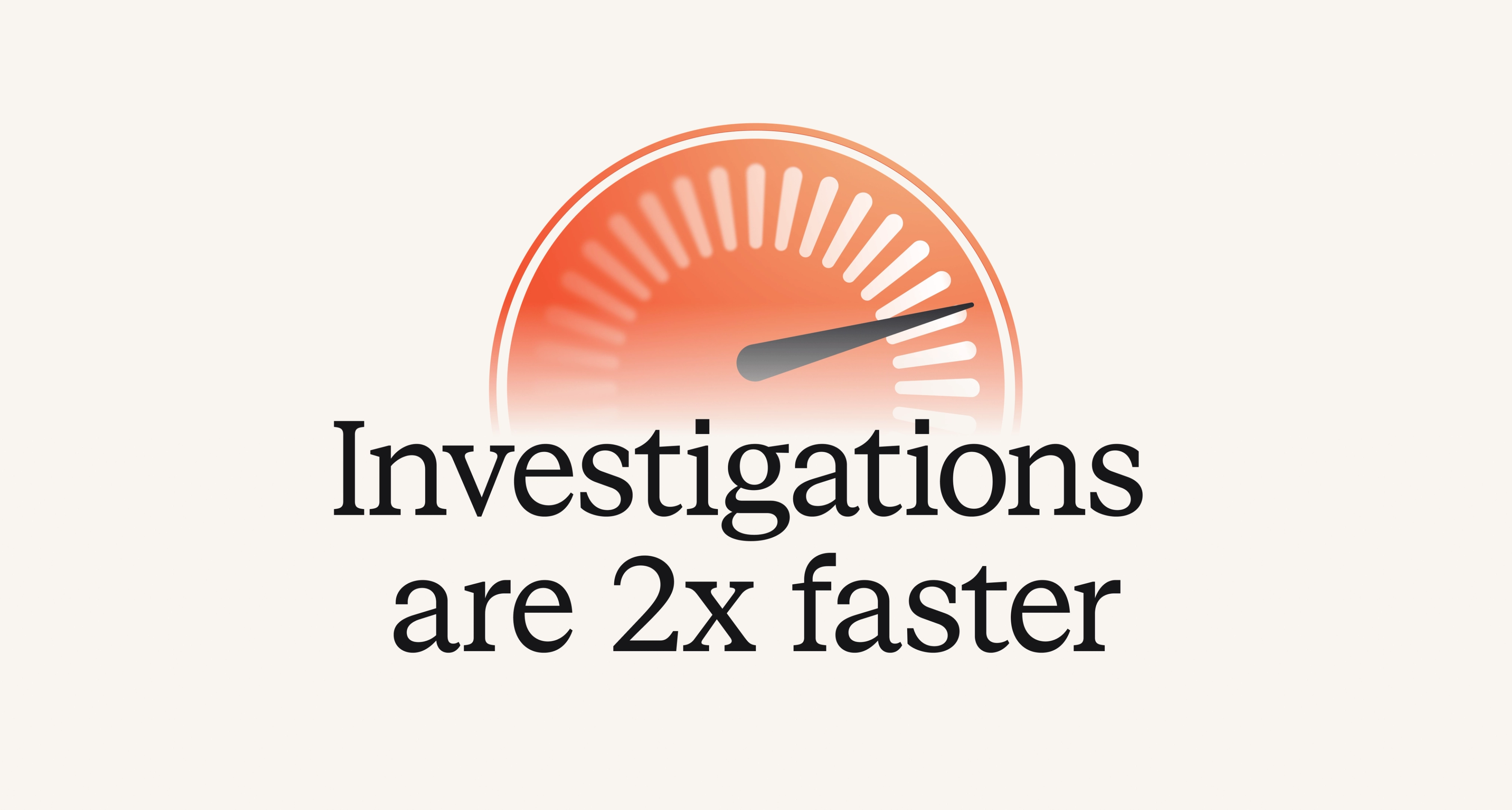
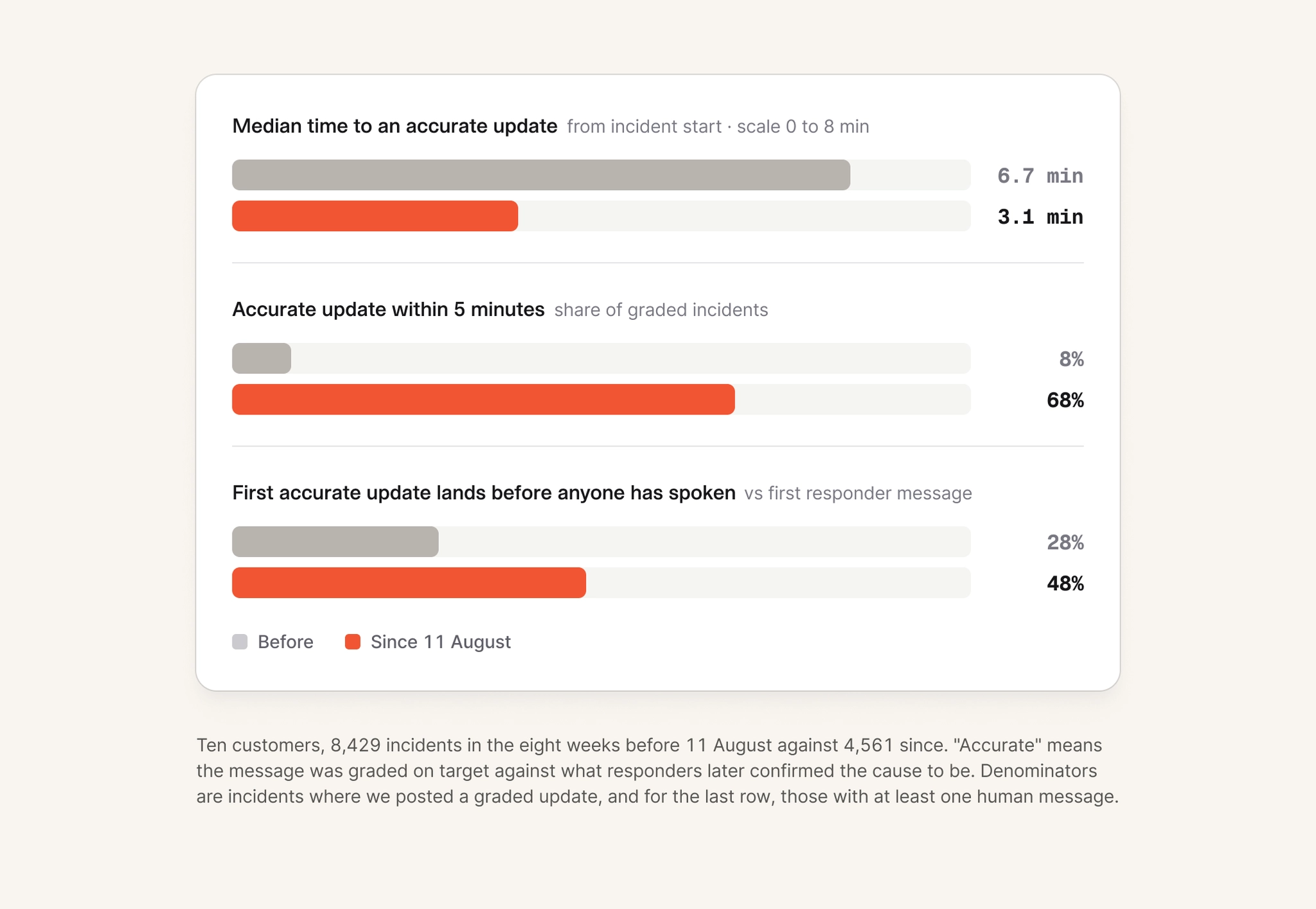
Investigations are now 2x as fast, with the median time from an incident opening to an accurate message arriving in channel having gone from 6.7 to 3 minutes. Before this change 8% of incidents got an accurate update within 5 minutes, now 68% do.
This speed-up comes from investing in our Investigation harness and a bunch of other optimizations that I’d like to walkthrough in this post.
Where the minutes went
An investigation begins when an incident is declared, often as result of an alert firing, and is structured as a tree of investigation ‘checks.’
Each check is a unit of work: a telemetry query, a code search, an agent following one of your runbooks. A findings step watches the results arrive and turns them into a hypothesis, a reviewer pushes back on the hypothesis, after which we write a summary. Only then did we send a message to the channel.
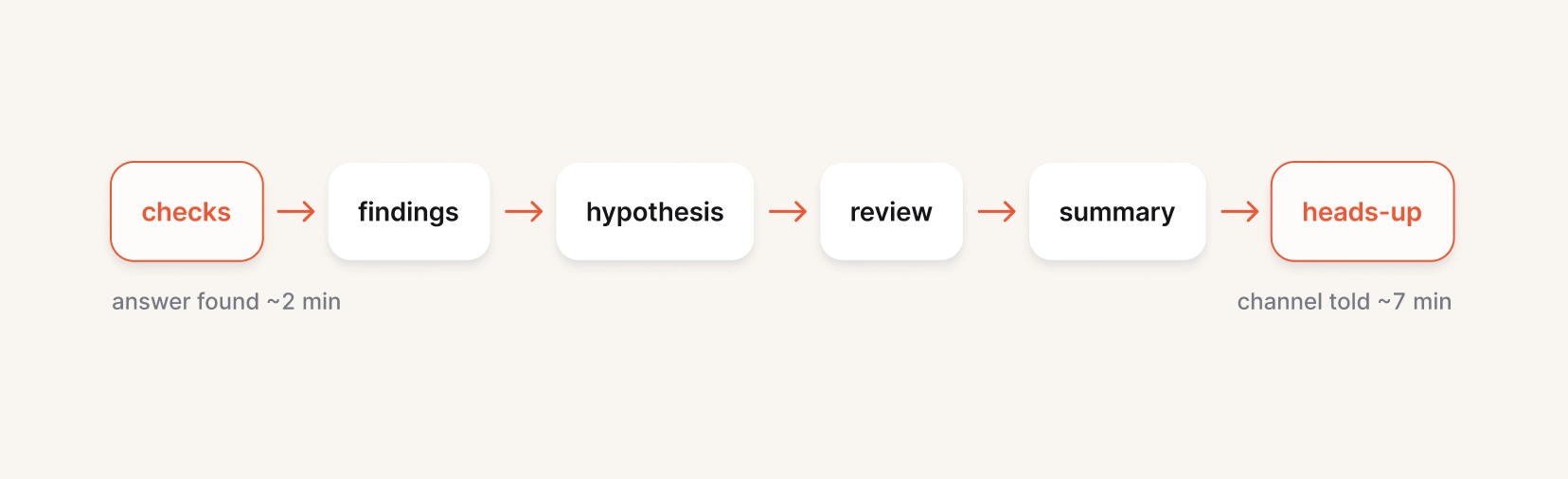
Investigations does a lot of work to ensure we are accurate: we have an agent collating findings (concrete observations) which is separate to the agent that produces a hypothesis, and another agent reviews that hypothesis and critiques it. This process ensures all our claims are substantiated with real evidence and works to eliminate inaccuracies, but each step takes time and delays us notifying responders.
Messaging earlier
The big change we’ve made is removing the need to run our heavy-duty hypothesis and review step before we tell responders what we’ve found.
When first building investigations it made sense to gate messages behind this process, as our agents were less sophisticated and our memories about how to act for an organization were less comprehensive. Nowadays, we are much smarter and we are much more able to diagnose an issue earlier in the pipeline and it be accurate.
In this world we find useful information very early in the pipeline, so it makes sense to allow early checks to directly notify the channel, provided the message satisfies our notification requirements:
- Is there concrete technical evidence? A result that is mostly unknowns, or "the runbook didn't cover this symptom,” stops here.
- Is it new to the channel? If a human already said it, we do not repeat it with a robot badge attached.
- Is the situation already handled? If responders have diagnosed the problem and are fixing it, we stay quiet.
- Would it change what responders do next?
If the message passes all these guidance, we’ll send it without any delay. If we later find more information or revise our understanding we can send follow-ups, but in practice it is rare (having passed these criteria) for the initial message to be wrong!
What it looks like
Here is one of our own incidents from last month, when an alert fired on the number of Prometheus series scraped from our worker pods.
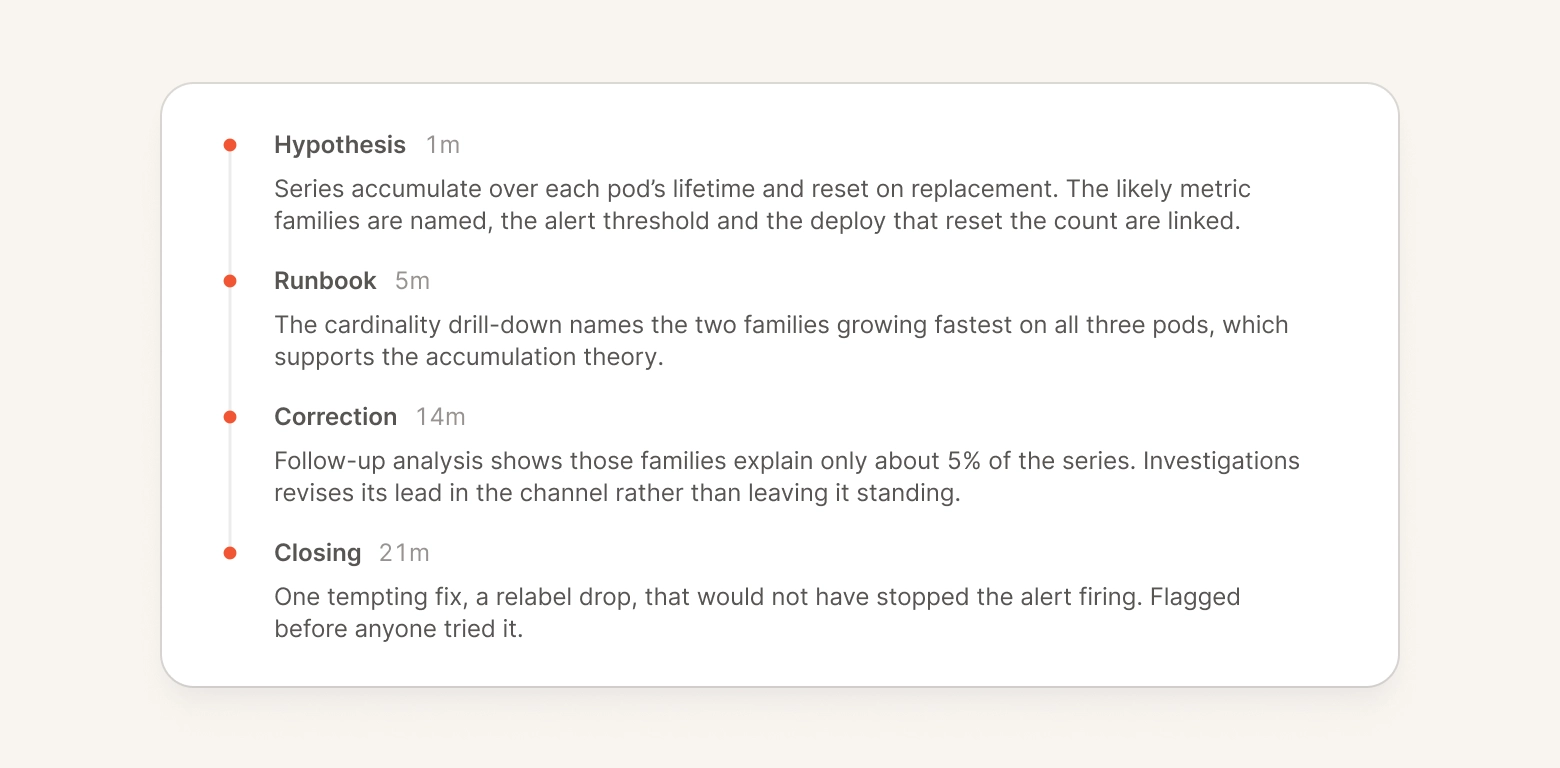
For the responder that joined 10 minutes after the incident had been declared, this is a really clear trail of findings that meant they could immediately resolve the incident with a fix. And even with us revising our understanding later, the breadcrumbs are easy to follow and match how a responder would debug themselves.
We use our backtesting system to evaluate changes like this before we deploy them, but in this case we went a step further and rolled it out gradually across customers, leading to a graph that looks like this
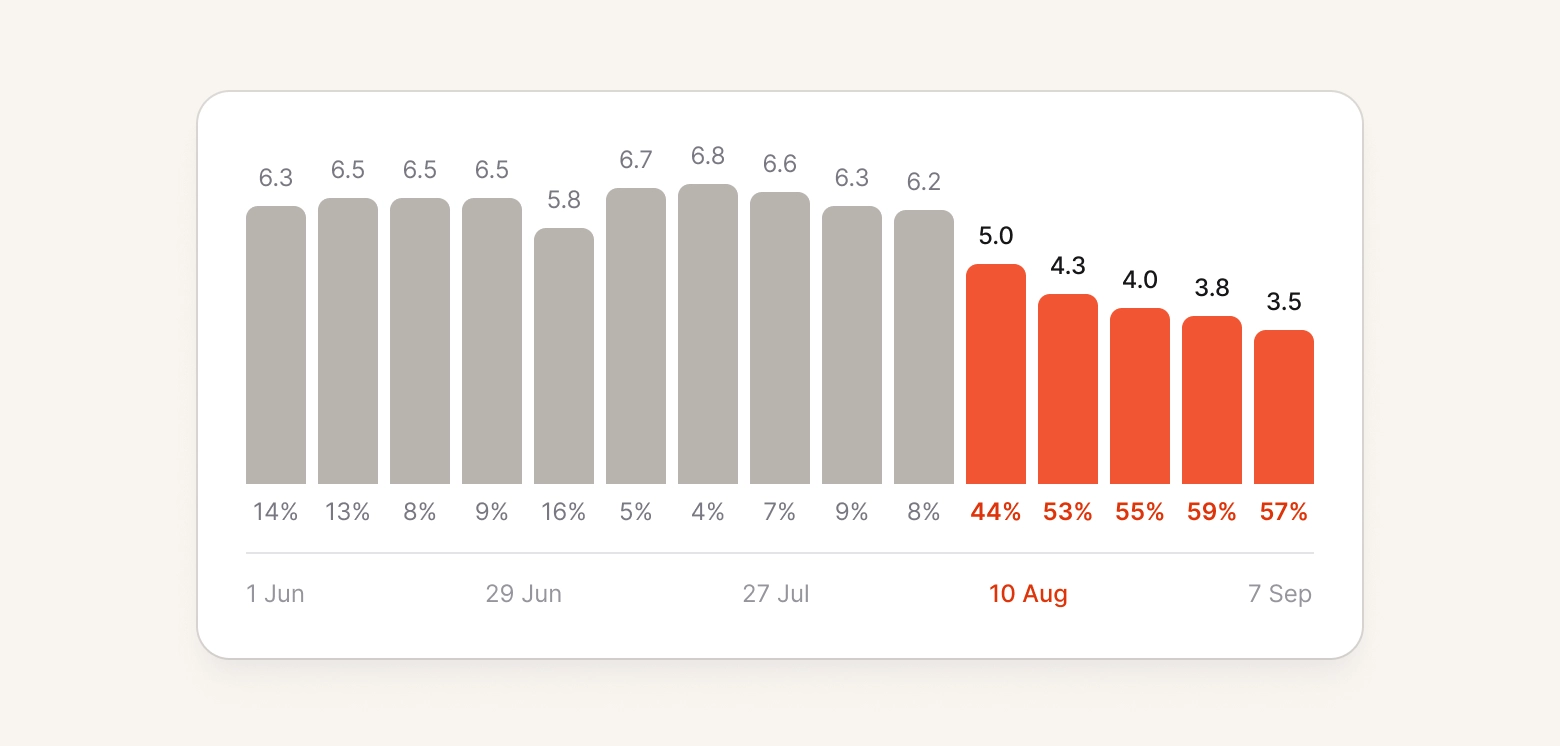
Since this change we have only had positive feedback on us more proactively notifying the channel, and we have monitored the messages for accuracy (graded retrospectively once an incident is resolved) and they continue to meet our quality bar.
We hope this makes Investigations feel even more like a proactive responder helping your team resolve incidents, and that we save you time where minutes really count!
Investigations
Improvements to code changes via the agent
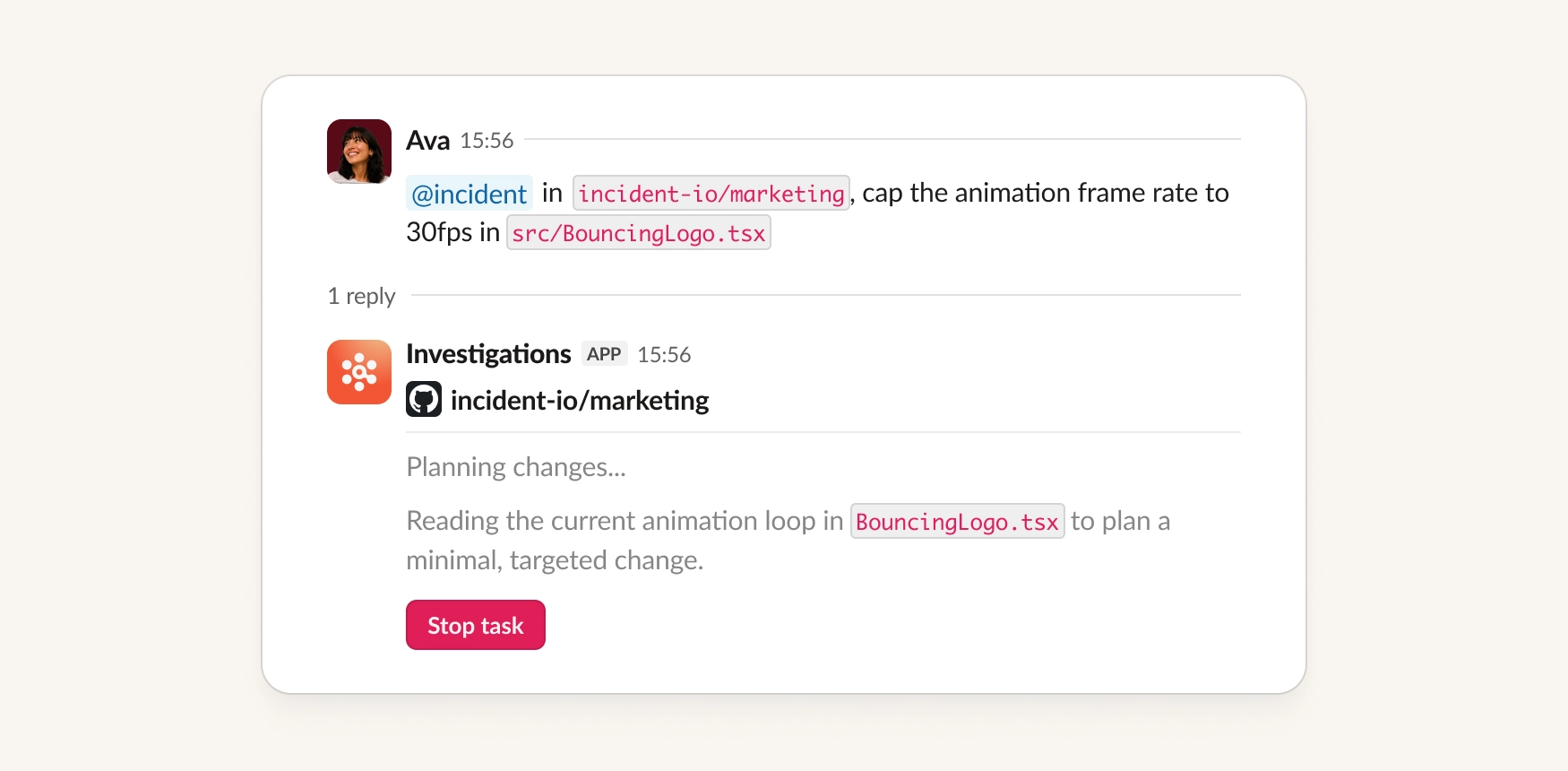
Until now, when you asked incident to make a code change, you had to wait for it to finish before you could ask for anything else. We've made some improvements to the flow:
- You can now queue follow-ups. Keep messaging the agent while it works and it'll apply your changes as soon as it finishes the current one. Best for when you're adding requirements to what it's already doing.
- Stop a task. Click the button on the agent's message so it discards the work in progress and starts again with your new message folded in. Best for when you want it off the old request immediately.
- Recover from a failure. If a change fails, tell the agent what to try differently and it'll work from your new message instead of just repeating the original request.
Customize investigation summaries
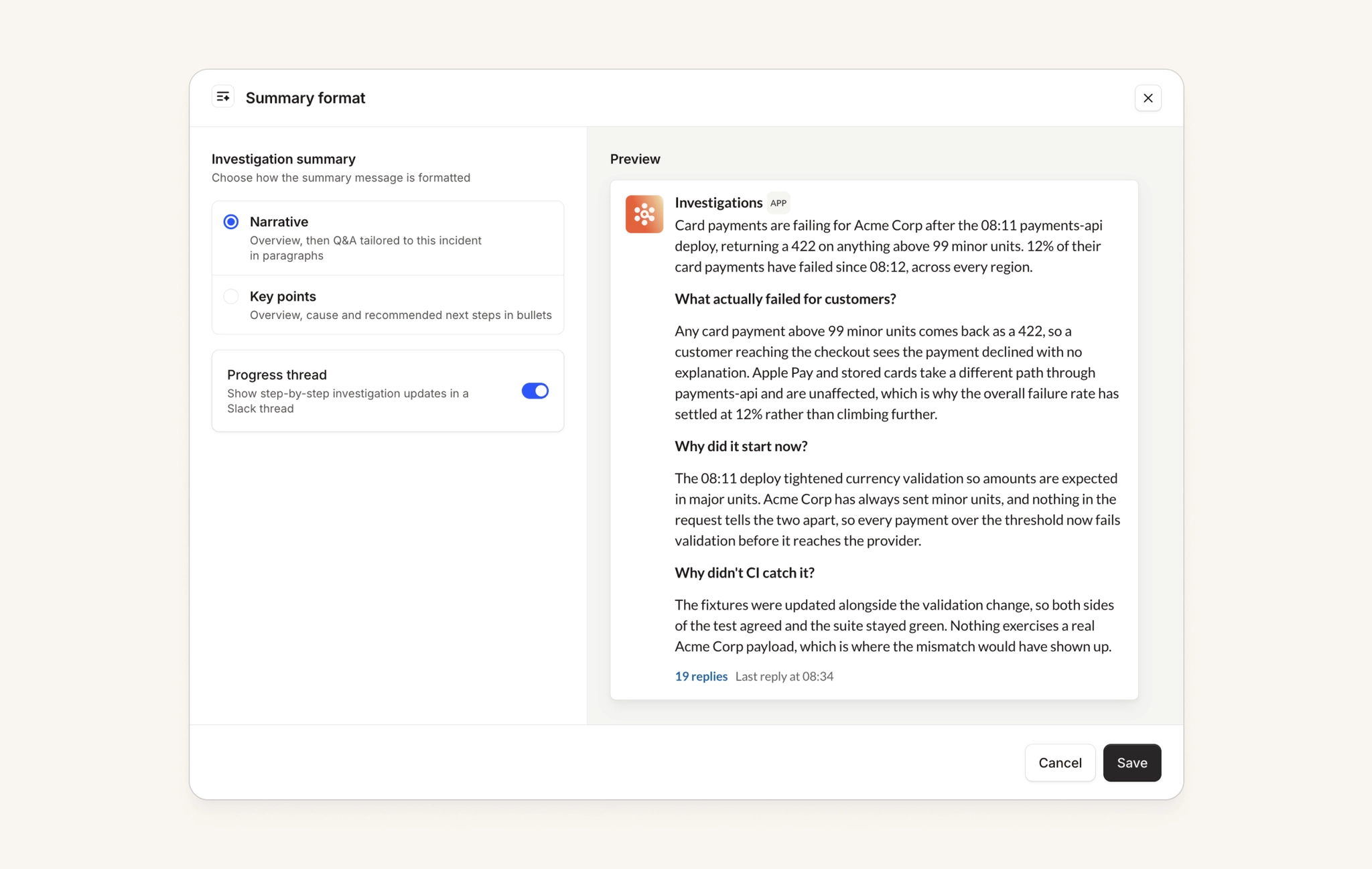
Teams read investigation summaries differently. Some want more structure, some want no progress thread at all, and some just want a two-line, get-to-the-point answer. We’ve added some new configuration options so you can:
- Choose a summary format. Narrative, with a dynamic Q&A format structured in paragraphs, or Key points, with specific cause and recommended next steps sections listed in bullets.
- Turn the progress thread on or off. Keep the step-by-step updates if your team likes following along with Investigations, or turn it off and keep just the pinned summary.
Both settings work the same way across Slack and Microsoft Teams.
On-call
Alert grouping preferences for teams
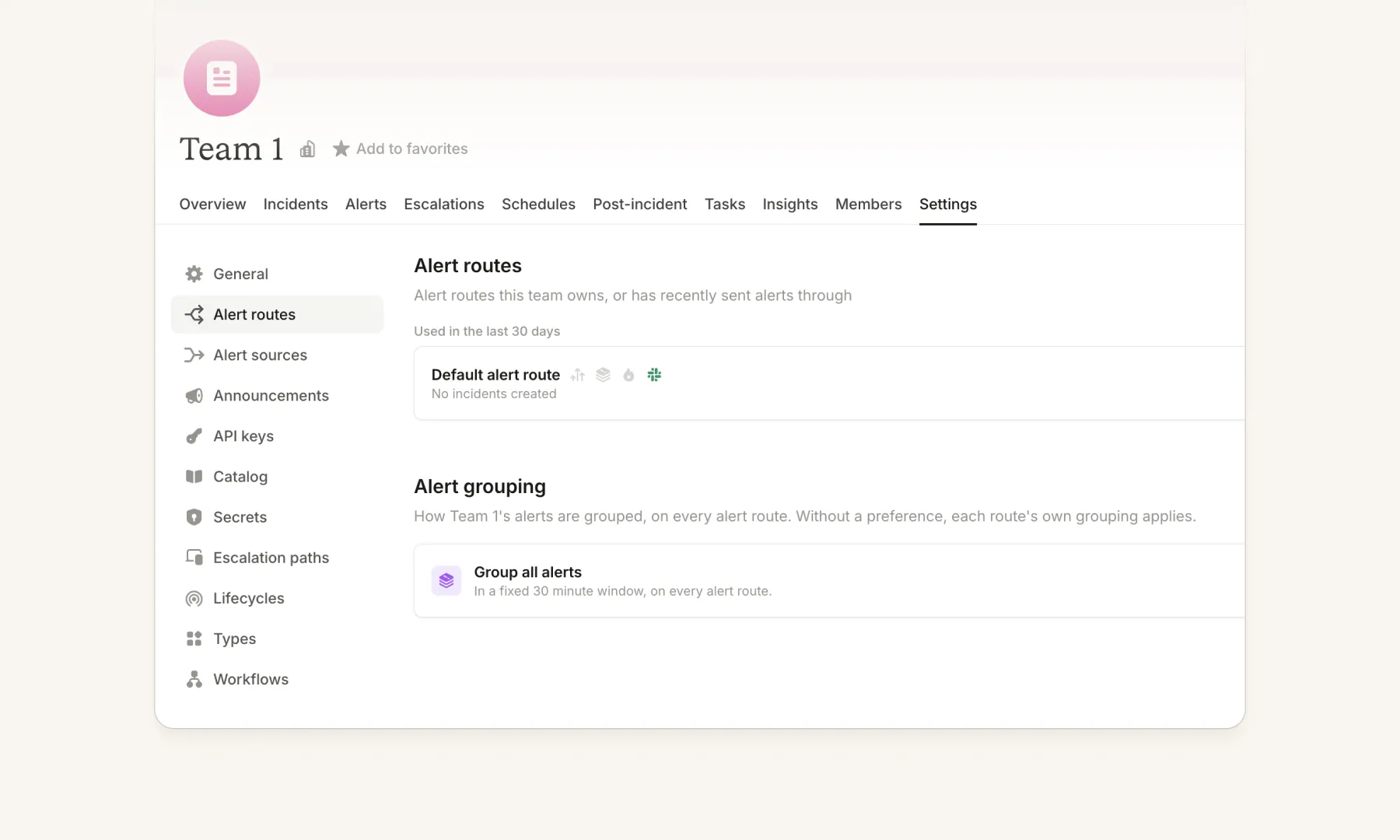
Until now, grouping settings for incoming alerts could only be configured on an alert route. If you wanted different grouping behavior for different teams, you'd need to have one alert route per team to give them that flexibility.
Now teams can set up their own grouping settings, which apply to alerts when only that team has been attributed to them. They're visible on both the team alert routes settings page, and in a new "Team Grouping" tab on the alert routes page. When no team preferences apply, we fall back to the alert route configuration instead. Escalation, incident, and channel message handling configuration is not impacted, and stays with the alert routes.
This feature is rolling out over the coming weeks, get in touch if you’d like to get it enabled sooner and check out our help docs here.
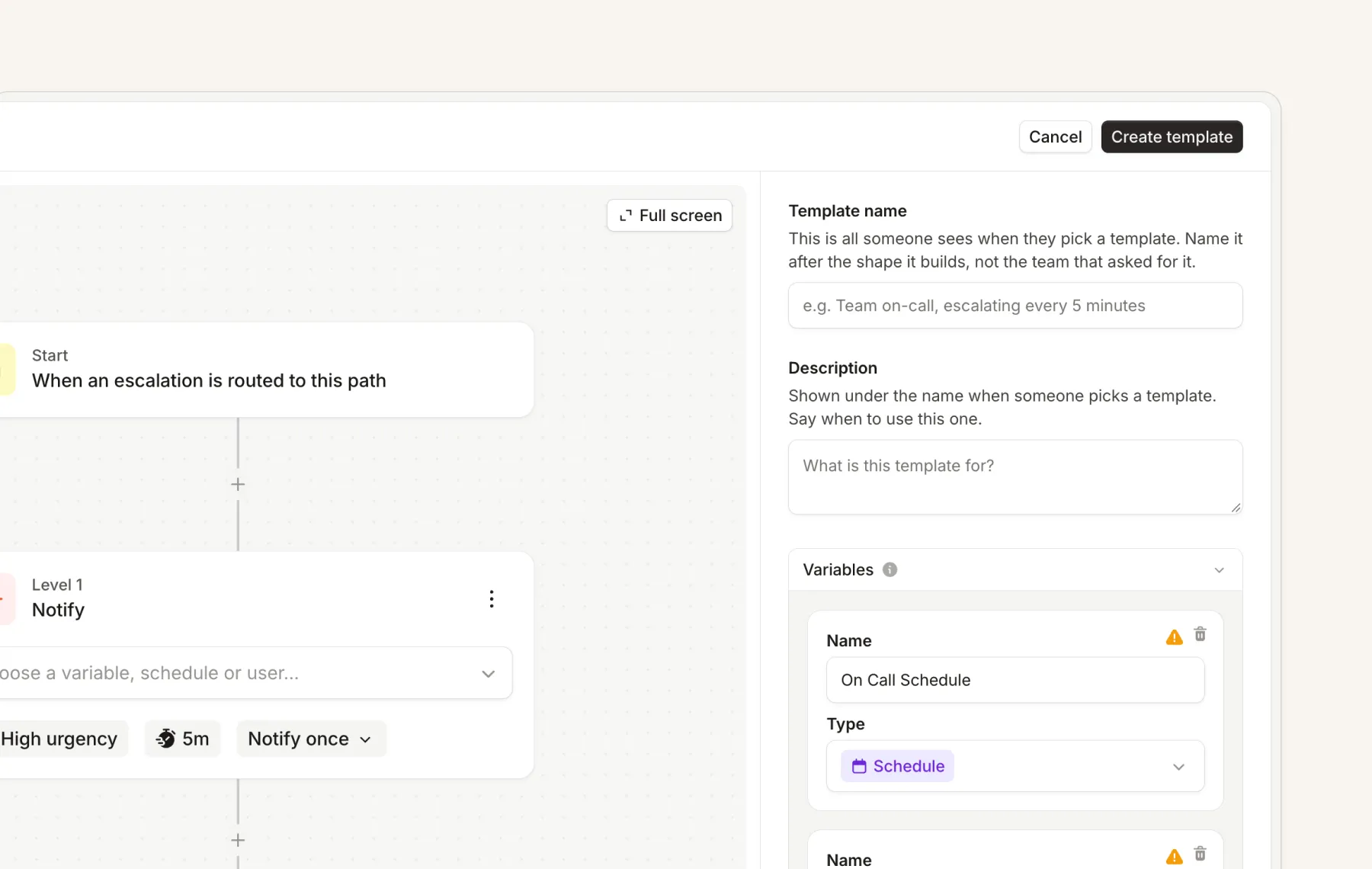
Escalation path templates
Managing escalation paths is now easier with templates. Define a template once and reuse it across escalation paths to give you a consistent setup across teams.
- Define variables for a template which are required for each escalation path. These can be Schedules, Users, Channels (Slack/Microsoft Teams), or Catalog Types.
- Use a template when creating an escalation path. The flow is simple: pick a template, fill out the required variables, and you have a working escalation path.
- Updating the template updates all escalation paths that use it, which helps maintain consistency across escalation paths.
- There's a dedicated health check experience for escalation path templates, which surfaces issues such as variables not being filled, or specific catalog entries that are missing an attribute. For example, if your path depends on
Team → Adminand the admin is empty, we'll surface that as a warning.
This is available in the public API, and in Terraform from v7.1.0
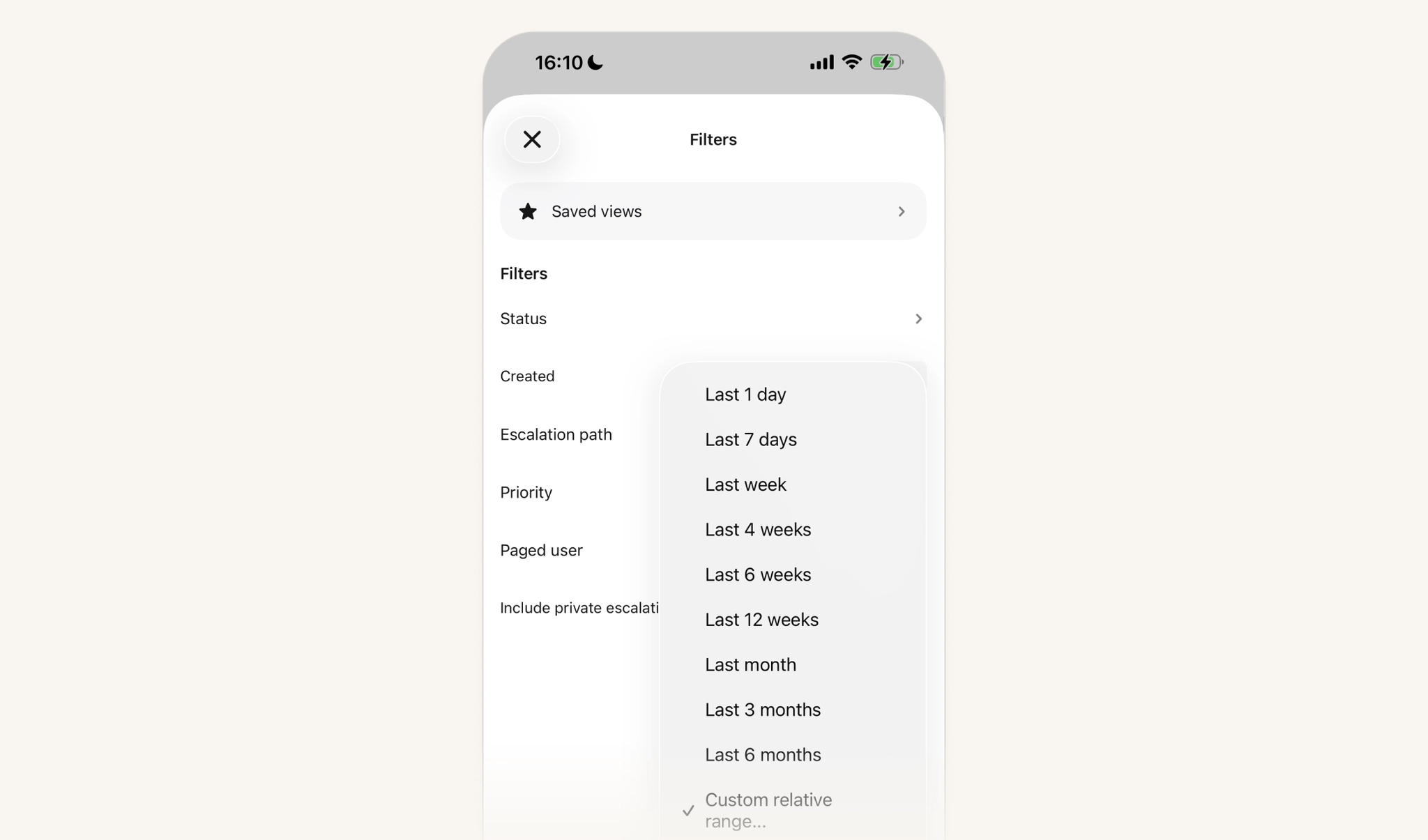
Better filtering for escalations on mobile
Escalations on mobile can now be filtered by all the fields that are available on the web app, with multi-select and full options available on each field. Saved views are also now available.
Pay configuration and reports in the public API
The configuration for our on-call pay calculator is now manageable through the public API, including the full create/read/update/delete set of actions, configuring base rate, currency, timezone, and name. Rules are also available as "sub resources" that can be configured, including weekly rules and one-off holiday rules, without having to change the pay configuration itself. We’ve also added new endpoints for creating, downloading and publishing pay reports.
This means you can automate setting up and managing this config, including things like automatically updating on-call pay rates whenever they change in your HRIS system, keeping public holidays up to date from calendar feeds, and much more.
You can read more in our API docs for pay configs and pay reports.
Response
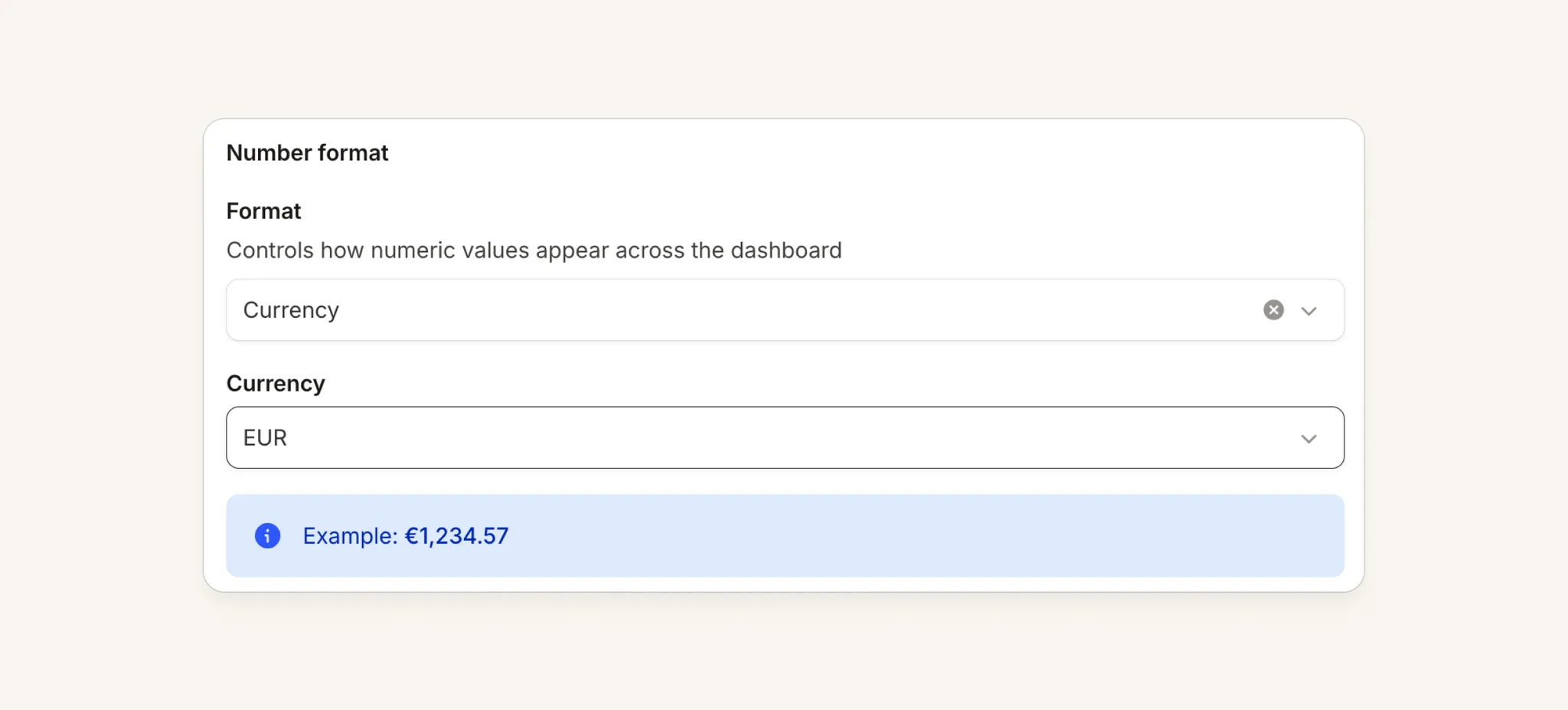
Number formatting in custom fields
You can now choose how we format a number custom field, for example, if you want to show it as a currency, or with a specific number of decimal places.
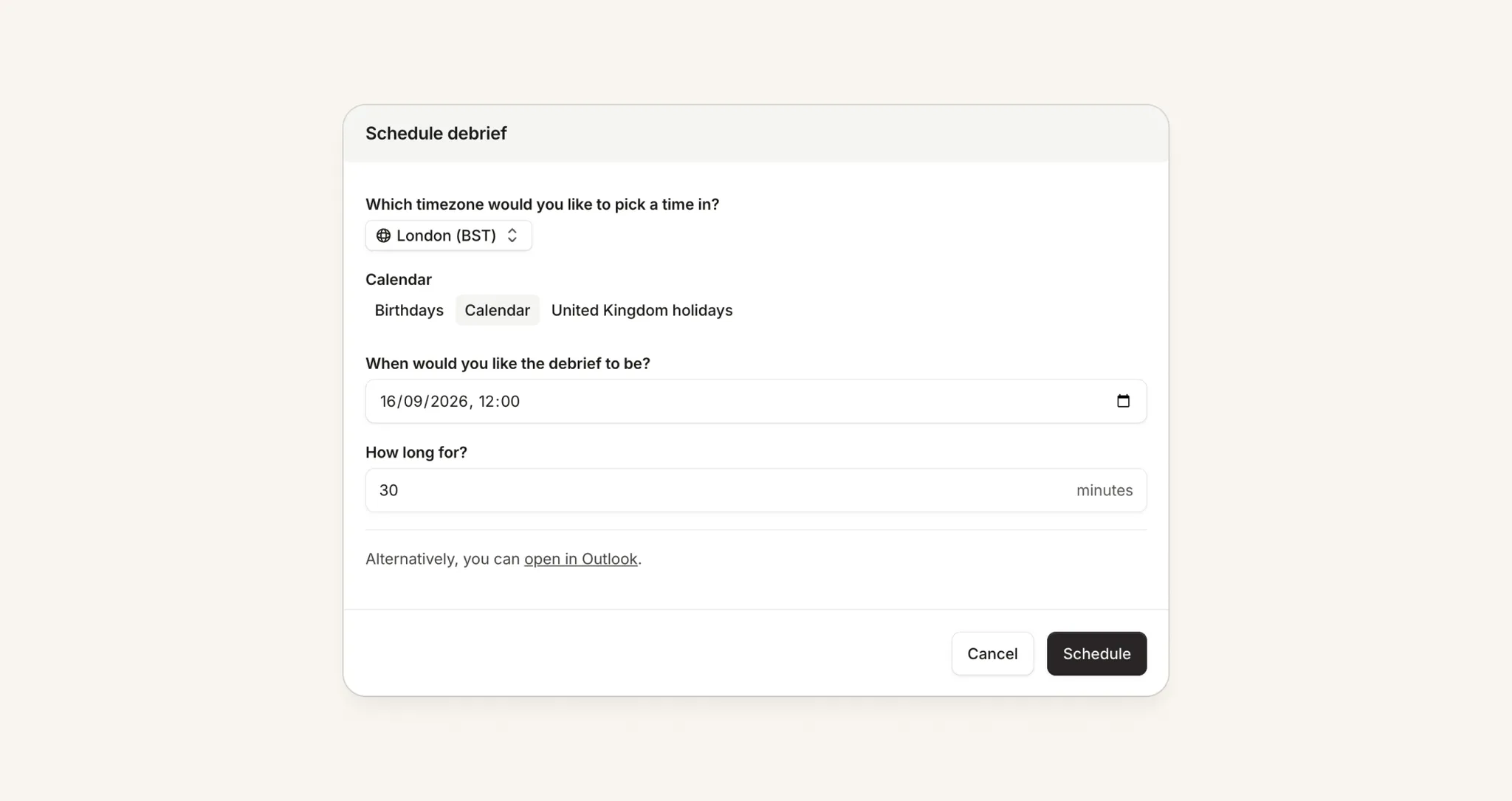
Improvements to debriefs
We've made a handful of improvements to how debriefs get scheduled:
- Schedule debriefs directly in Outlook from our dashboard, without opening Outlook. This also means event descriptions over 200 characters don't get truncated.
- Schedule Google Calendar debriefs by time and duration, without having to set up placeholders.
- Add Scribe to a debrief call. If we detect a video call on a debrief invite, there's now a button to add Scribe to that call and add the notes to the postmortem document.
- Require debriefs to be booked within placeholders. Once you've set up debrief placeholders, you can force everyone to schedule all debriefs in them, in Settings → Debriefs.
Converting Slack incidents between public and private
In many Slack workspaces, you need to ask a colleague to change a channel between public and private.
We can now do this for you, both via our dashboard and in Slack using /inc private or /inc public in a channel.
For this to work:
- You must be on the Slack Enterprise plan
- You must add 'privileged Slack access', with a user that has permission to change channel types across the whole enterprise org
Platform
Microsoft Intune integration
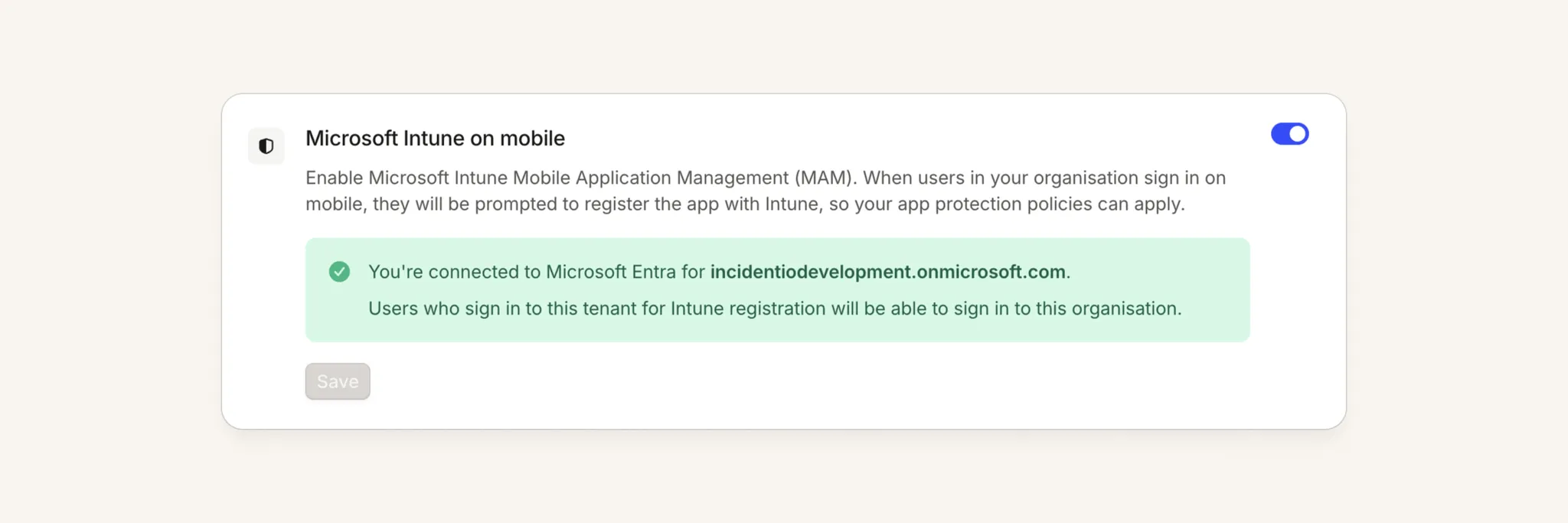
If you're on an Enterprise plan, you can now put the incident.io mobile app under Microsoft Intune app protection. Protection is applied at the app level, so it works on both MDM and personal (BYOD) phones.
If you're on Restricted Mobile Access, you can move over to Intune at your own pace. Once enabled, it takes over from the second SAML config and the redacted data view.
Setup guide: docs.incident.io/admin/microsoft-intune
Supported mobile versions: iOS/Android 1.15.0 or above
Our Android, iOS & MacOS apps have a new icon
We’ve consolidated our app icons so they now all have a familiar alarmalade background, which you’ll start to see as the next version of the app rolls out this week across devices.

What else we've shipped
New
- On-callYou can now filter the escalations list on mobile, bringing it to parity with web. Narrow down by team, alert source, priority, and other attributes to focus on the escalations relevant to you.
- ResponseIf you use Jira as a CMDB, you can now opt in to using Jira 'assets' when you connect via OAuth, which makes any asset-type fields available for incident tickets and follow-ups. If you're already connected, you'll need to disconnect and reconnect to access this.
- ResponseA new public API endpoint creates a follow-up from an external link in a single step, matching the dashboard, instead of creating the follow-up and attaching the link separately.
- ResponseOur Shortcut integration now supports incident tickets, with bidirectional sync.
- ResponseYou can now target the person who reacted to a Slack message in the reaction-added workflow trigger, so steps like Assign incident roles can act on the reactor instead of the message's original sender.
- Status PagesYou can now customize the message shown on your status page when there are no active incidents, instead of having to use the default "we're not aware of any issues" text.
- PlatformYou can now opt in to redacting email addresses and Slack usernames from data sent to LLMs, on top of the existing PII redaction, plus a new option to redact PII everywhere before it reaches an LLM.
Improvements
- ResponseThe "manage options manually" control when creating a custom field now reads clearly as a clickable link with a leading question, so it's no longer mistaken for plain helptext.
- InvestigationsWe've added a prompt to the investigation timeline that invites you to ask the agent to dig deeper into an investigation, making it easy to explore the underlying sources and tool calls without cluttering the default view.
- InvestigationsWe've extended PostgreSQL telemetry source settings so you can now update the host, IP address, and client/server certificates directly in the UI, without needing an account admin or owner.
- PlatformSwitching organizations in the dashboard now keeps you on the page you're viewing, instead of sending you back to the homepage.
Bug fixes
- On-callFixed an issue where SMS alerts to phone numbers in Spain could fail to send after a carrier-mandated change to the registered sender ID.
- On-callFixed an issue where whilst editing a schedule in the dashboard, the form could reset to show versions prior to the version you were editing
- InvestigationsFixed an issue where a duplicated chatbot request could be processed twice at the same time, corrupting the conversation's history and causing the assistant to lose context and restart mid-conversation.
- InvestigationsFixed an issue where syncing a Grafana instance with more than 1,000 dashboards could incorrectly archive previously selected dashboards, removing them from your investigation dashboard list.
- InvestigationsFixed an issue where Honeycomb telemetry links generated for investigations pointed to an invalid dataset and failed to open the correct query.
- InvestigationsFixed an issue where the investigations feedback prompt wasn't posted to the incident channel if you had muted proactive investigation notifications.
- InvestigationsFixed an issue where connecting Grafana from the integrations page failed with a token error if your Grafana instance had no custom home dashboard set, even though the token and permissions were correct.
- InvestigationsFixed an issue where Investigations cards in Microsoft Teams showed a broken image instead of the incident.io icon.
- InvestigationsFixed an issue where Grafana dashboard links using a custom external UI URL weren't automatically detected in incident channels, so they now trigger a screenshot without needing to @mention the bot.
- NexusFixed an issue where truncated repository names in the Nexus document sync setup gave no way to see the full name — you can now hover to reveal it.
- PlatformFixed an issue where series in comparison mode on native dashboards could share the same colour across different time periods, making it harder to tell them apart at a glance.
- PlatformFixed an issue where a long value in a multi-select couldn't be removed because its chip overflowed the container and the remove button became unclickable.
- Fixed an issue where asking @incident to close an incident could skip a required post-incident flow, bypassing the opt-out permission. Closing now enters the flow the same way resolving does, and only lets you skip it if you hold permission to opt out.
So good, you’ll break things on purpose
Ready for modern incident management? Book a call with one of our experts today.

We’d love to talk to you about
- All-in-one incident management
- Our unmatched speed of deployment
- Why we’re loved by users and easily adopted
- How we work for the whole organization



